Bootc and OSTree: Modernizing Linux System Deployment

Introduction
For several years, I’ve been looking to manage my system configuration “As-code” to ensure reproducibility and consistency across my environments. The primary goal was to install my work laptop, but I also need to install Linux servers (without Kubernetes, so Talos isn’t an option).
Initially, I used Packer to generate a virtual machine image, which I would then clone onto the disk of the machine I wanted to configure. It worked very well for server templates, but for a dev machine, it was a bit of a patchwork solution. On top of that, I decided to look for a Packer alternative because of Hashicorp’s licensing changes (a decision I still struggle to accept!).
NixOS was an excellent replacement for a while, but I ran into several problems without having the necessary skills to solve them. I migrated to Fedora Silverblue, another immutable distribution in which I have more confidence. I found the comfort of a classic Linux installation while benefiting from the advantages of an immutable system.
Note
Quick side-note: I’ll be talking a lot about OSTree in the context of CoreOS and Fedora Silverblue, but this technology isn’t exclusive to these distributions. We can also mention Fedora CoreOS, Endless OS, and even Podman’s virtual machine when on macOS or Windows.
But I feel like I’m getting ahead of myself, so let’s start at the beginning.
OSTree: Git for Filesystems
OSTree is often described as “Git for filesystems”. It enables versioning, distribution, and atomic deployment of Linux systems. Rather than managing packages individually, OSTree stores complete system snapshots, making updates and rollbacks easier.
It’s based on ComposeFS, whose primary focus is ensuring data integrity. It relies on EROFS (Enhanced Read-Only File System) to guarantee that data won’t be corrupted and to store file metadata. It natively performs data deduplication and LZ4 compression.
For the user, this is completely transparent.
❯ mount | grep -e "overlay" -e "erofs"
composefs on / type overlay (ro,relatime,seclabel,lowerdir+=/run/ostree/.private/cfsroot-lower,datadir+=/sysroot/ostree/repo/objects,redirect_dir=on,metacopy=on)
lowerdir is the read-only directory (composefs) containing file metadata, and datadir is the directory containing the data (erofs).
The data (in /sysroot/ostree/repo/objects) is stored in a dedicated directory that contains all system versions. Each version is identified by a hash, similar to Git.
❯ ls /ostree/repo/
config  extensions  objects  refs  state  tmp
❯ ls /ostree/repo/objects/05/
02404180f5f1f775c1dc71850f19339064d281b433ec340730f96be2aa9c4f.file  5e77706a79f15f1c6b13713c0a05e8aca051ebb40bce01832b5ce0145ee3cc.file  c01726f16a1c315014f946ee821e27b646536dae6aa70f39ed96eee0bea6c7.file
0fff529c3a948b1f56d0973eca5f840a1459c5ef43806f3c451f2fd835ebe2.file # ...
The comparison with Git doesn’t stop there - OSTree allows you to create commits, new versions of our system, and switch between these versions just like you would with Git commits (git commit and git checkout).
Let’s look at a Silverblue laptop I recently installed, for example:
  ostree-image-signed:docker://ghcr.io/ublue-os/bluefin-dx:latest
                   Digest: sha256:7aabc7db3c3212ab3efd4a93dd895ee09c82a7af8d7c2e952bfb80f0058110a6
                  Version: latest-42.20251010.1 (2025-10-10T04:58:09Z)
                     Diff: 36 upgraded, 3 added
          LayeredPackages: brightnessctl btop emacs erofs-utils gammastep gh ghostty kubectl matugen niri pavucontrol pcsc-tools quickshell-git trayscale vimiv wl-mirror zoxide

● ostree-image-signed:docker://ghcr.io/ublue-os/bluefin-dx:latest
                   Digest: sha256:55481755d5d9ae678150b86962d75d15dd8ba2709664a64427197d5cdd083140
                  Version: latest-42.20251008 (2025-10-08T02:20:33Z)
          LayeredPackages: brightnessctl btop emacs gammastep gh ghostty kubectl matugen niri pavucontrol pcsc-tools quickshell-git trayscale vimiv wl-mirror zoxide
I have 2 commits identified by their hash (Digest). I’m on the older one (bottom with the ● marker), but I can easily switch to the newer one by restarting my system (atomic method) or by using the rpm-ostree apply-live command to apply the update without restarting.
In addition to seeing the differences between versions (36 upgraded packages, 3 new ones), we can also see the additional packages I’ve installed on top of the base image (LayeredPackages). I can also ask ostree to display the commit content, just like I would with git show.
$ ostree admin status
  default 5ef5958f30a0ba985961f1a9e1e8a672287ad5b67e8092bce724cf9c72147484.0 (staged)
    origin: <unknown origin type>
* default e595112738655e363e10ecbdb9378adcd6ebaebc23c1113c4d980e6b71e30b17.0
    origin: <unknown origin type>
$ ostree ls --repo=/sysroot/ostree/repo e595112738655e363e10ecbdb9378adcd6ebaebc23c1113c4d980e6b71e30b17 /
d00555 0 0      0 /
l00777 0 0      0 /bin -> usr/bin
l00777 0 0      0 /home -> var/home
l00777 0 0      0 /lib -> usr/lib
l00777 0 0      0 /lib64 -> usr/lib64
l00777 0 0      0 /media -> run/media
l00777 0 0      0 /mnt -> var/mnt
l00777 0 0      0 /opt -> var/opt
l00777 0 0      0 /ostree -> sysroot/ostree
l00777 0 0      0 /root -> var/roothome
l00777 0 0      0 /sbin -> usr/sbin
l00777 0 0      0 /srv -> var/srv
d00755 0 0      0 /boot
d00755 0 0      0 /dev
d00755 0 0      0 /proc
d00755 0 0      0 /run
d00755 0 0      0 /sys
d00755 0 0      0 /sysroot
d01777 0 0      0 /tmp
d00755 0 0      0 /usr
d00755 0 0      0 /var
Yes, since hashes are calculated differently between ostree and rpm-ostree, they don’t match, so I have to retrieve the equivalent hash with ostree
The possibilities are pretty wild from here. I can do ostree checkout, ostree commit, ostree diff, etc. The Git inspiration is really omnipresent (and that’s a good thing). In short, OSTree’s advantages are numerous, such as:
- Atomicity: Updates are applied in a single operation at reboot, reducing the risk of inconsistency.
- Easy rollback: In case of problems, it’s possible to return to a previous system version (it creates a boot menu entry at each update).
- Version management: Each system state is versioned, making tracking easier
- Efficient distribution: We rely on a known and proven distribution method - more on that later!
But of course, like any immutable system, there are mutable parts (otherwise, we couldn’t create any configuration files). OSTree handles this with “overlays” (actually, we use OverlayFS) that allow a read-write filesystem to be layered on top of the immutable system. For example, the /etc and /var directories are writable, while the rest of the system is read-only.
To give some detail, it’s /var that is writable, and mutable directories will have symbolic links pointing to subdirectories of /var:
/home→/var/home/opt→/var/opt/srv→/var/srv/root→/var/roothome/usr/local→/var/usrlocal/mnt→/var/mnt/tmp→/sysroot/tmp
/etc is also writable, but it’s managed a bit differently. OSTree uses a technique called “etc overlay” to handle modifications in /etc. When an update is applied, OSTree compares files in the new version with those in /etc and applies changes intelligently, preserving local modifications as much as possible.
Thus, there’s the /usr/etc folder containing the immutable version of configuration files, and /etc which is the mutable directory. If I modify a file in /etc and ask OSTree to compare with the new version, it will show me the differences and preserve my local modifications.
❯  ls /usr/etc/motd
/usr/etc/motd

❯ sudo ostree admin config-diff | grep motd # No diff

❯ echo "Hello, World!" > /etc/motd

❯ sudo ostree admin config-diff | grep motd
M    motd
I really like this approach and find it reassuring about OSTree’s ability to manage service configurations without forcing us to never modify them.
A Package Manager for OSTree: rpm-ostree
OSTree manages the files that make up the system, but what does that mean for packages that want to write to /usr or /lib? That’s why integration with the package manager is needed. In the case of RedHat OSes, it’s rpm-ostree that replaces dnf and yum.
❯ dnf install neovim
Error: this bootc system is configured to be read-only. For more information, run `bootc --help`.
As soon as we try to install a package with dnf, we’ll get an error. We need to use rpm-ostree to manage packages.
❯ rpm-ostree install neovim
Checking out tree 39fd9fc... done
Resolving dependencies... done
Will download: 17 packages (55.1 MB)
Downloading from 'updates'... done
Downloading from 'fedora'... done
Importing packages... done
Checking out packages... done
Running systemd-sysusers... done
Running pre scripts... done
Running post scripts... done
Running posttrans scripts... done
Writing rpmdb... done
Writing OSTree commit... done
Staging deployment... done
Freed: 126.9 MB (pkgcache branches: 0)
Added:
  compat-lua-libs-5.1.5-28.fc42.x86_64
  erofs-utils-1.8.10-1.fc42.x86_64
  inotify-tools-4.23.9.0-4.fc42.x86_64
  intel-qpl-1.7.0-1.fc42.x86_64
  libluv-1.51.0.0-2.fc42.x86_64
  libtsan-15.2.1-1.fc42.x86_64
  libvterm-0.3.3-5.fc42.x86_64
  lua5.1-lpeg-1.1.0-5.fc42.x86_64
  luajit-2.1.1748459687-2.fc42.x86_64
  luajit2.1-luv-1.51.0.0-2.fc42.x86_64
  neovim-0.11.4-1.fc42.x86_64
  nodejs-1:22.19.0-2.fc42.x86_64
  nodejs-docs-1:22.19.0-2.fc42.noarch
  nodejs-full-i18n-1:22.19.0-2.fc42.x86_64
  nodejs-libs-1:22.19.0-2.fc42.x86_64
  nodejs-npm-1:10.9.3-1.22.19.0.2.fc42.x86_64
  ripgrep-14.1.1-2.fc42.x86_64
  tree-sitter-cli-0.25.10-1.fc42.x86_64
  unibilium-2.1.2-3.fc42.x86_64
  xsel-1.2.1-8.fc42.x86_64
Changes queued for next boot. Run "systemctl reboot" to start a reboot
After my package has been installed, rpm-ostree indicates that changes will be applied at the next reboot. Indeed, rpm-ostree creates a new OSTree commit with the added package, but doesn’t modify the running system. This is an important step to guarantee update atomicity.
If I still want to apply changes immediately, I can use the rpm-ostree apply-live command which will apply changes without restarting the system (but some modifications may require a reboot to be fully effective).
And conversely, if I want to revert the modifications, that’s also possible:
❯ rpm-ostree rollback
Bootc: Linux in Container Mode
Yes, because if I have to go through Fedora’s standard workflow with kickstarts to install my machines, it doesn’t get me much further than before. This is where Bootc comes in.
If we use OCI images to automate application deployment, why not use the same approach to deploy operating systems? That’s exactly what Bootc offers. It’s a project that allows you to boot a Linux system directly from a container image. The idea is to treat the operating system as an immutable image, making management, reproducibility, and security easier.

The major difference from a classic container image is that the image used by Bootc contains a complete system, including the Linux kernel, libraries, system tools, and applications.
Once the image is generated, we can do pretty much whatever we want with it: use it to generate a .qcow2 image for a VM, couple it with anaconda to do a bare-metal installation, store it in an image registry to deploy on cloud servers, etc.
I should clarify that OCI is a distribution method - the deployed system won’t run in a container, we’re booting a real Linux.
Relationship Between Bootc and OSTree
Both are distinct projects, but they can be used together to create a powerful workflow for managing Linux systems. OSTree manages files and packages (with rpm-ostree for example), while Bootc handles creation, deployment, and orchestrates update processes.
They complement each other perfectly and allow for a modern and efficient process for managing Linux servers.
I’m talking almost exclusively about Fedora because RedHat is heavily invested in these projects and deeply integrates them into their ecosystem (Fedora Silverblue, CoreOS, OpenShift…) but there are still some ports to other distributions.
If you’re interested, I discovered this issue that lists OSTree ports for other distributions (Linux Mint, Arch, Ubuntu, Gentoo).
Now that the theory is laid out, I’ll show you how to use these tools to deploy a Fedora Silverblue.
Deploying a Bootc Image
Let’s take a fairly simple and concrete case: I want to install Fedora Silverblue on one of my servers using a system prepared with Bootc. As explained previously, Bootc uses OCI images, so we’ll start by creating a Containerfile (equivalent to a Dockerfile but for podman).
FROM quay.io/fedora/fedora-bootc:latest

# -- Package installation --
## Enable RPM Fusion repositories
## https://rpmfusion.org/
RUN dnf install -y https://mirrors.rpmfusion.org/free/fedora/rpmfusion-free-release-$(rpm -E %fedora).noarch.rpm https://mirrors.rpmfusion.org/nonfree/fedora/rpmfusion-nonfree-release-$(rpm -E %fedora).noarch.rpm

ENV BASE_PKG="tmux unzip vim htop qemu-guest-agent @container-management @hardware-support zsh rsync"
RUN dnf install -y ${BASE_PKG} && \
    dnf clean all

# -- User setup --
ARG USERNAME
ARG PASSWORD

RUN groupadd -g 1000 ${USERNAME} \
    && useradd -m -u 1000 -g 1000 -G wheel -s /bin/zsh -K MAIL_DIR=/dev/null ${USERNAME} \
    && echo "${USERNAME}:${PASSWORD}" | chpasswd \
    && mkdir -p /home/${USERNAME} \
    && chown ${USERNAME}:${USERNAME} /home/${USERNAME} \
    && chmod 700 /home/${USERNAME}

# -- Finalize container setup --
RUN bootc container lint
Concretely, we start from a base Fedora image with Bootc prepared. Then, we install the necessary packages (including qemu-guest-agent for a VM) and create a user with a password. Finally, we validate that the image is correct with bootc container lint.
But didn’t you explain that you have to use
rpm-ostreeto install packages and notdnf?
Yes… and no! Actually during the image build, we must use dnf (because we’re not in a running system) and we can modify any directory as we would in a classic distro. It’s only once the image is deployed that we need to use rpm-ostree to manage packages.
Building the image is done with podman (or docker if you prefer).
sudo podman build -t my-silverblue:latest --build-arg USERNAME=qjoly --build-arg PASSWORD=supersecret .
The sudo is necessary depending on your choice in the next step.
This gives fairly heavy images (2.2GB for this base Fedora Silverblue image), but that’s the price to pay for having a complete, ready-to-use system.
❯ sudo podman image ls
REPOSITORY                                TAG         IMAGE ID      CREATED             SIZE
localhost/my-silverblue                   latest      7784e0c9cde1  About a minute ago  2.26 GB
Now that we have our image, we have two options:
- Build an
iso(or other) with the OCI image for a complete installation. - Take a standard Fedora Silverblue and ask it to switch to our OCI image with
bootc switch.
The first option is the simplest. There’s an official RedHat project called bootc-image-builder that allows generating installation images (ISO, QCOW2, AWS AMI, etc.) from an OCI image.
sudo podman run \
               --rm \
               -it \
               --privileged \
               --pull=newer \
               --security-opt label=type:unconfined_t \
               -v /var/lib/containers/storage:/var/lib/containers/storage \
                -v ./output:/output \
               quay.io/centos-bootc/bootc-image-builder:latest \
               --type anaconda-iso \
               --use-librepo=True \
               localhost/my-silverblue:latest --rootfs xfs
Trying to pull quay.io/centos-bootc/bootc-image-builder:latest...
Getting image source signatures
Copying blob 093e6ed8faf1 done   |
Copying blob 926690fefe60 done   |
Copying config f1c302e11f done   |
Writing manifest to image destination
[/] Disk image building step
[9 / 9] Pipeline bootiso [---------------------------------------------------------------------------------------------------->] 100.00%
[3 / 3] Stage org.osbuild.implantisomd5 [------------------------------------------------------------------------------------->] 100.00%
Message: Results saved in .
The fact that we must run the container with sudo is explained by the fact that it must be privileged and have access to our images directory in /var/lib/containers/storage.
The result is in the output directory that I mapped as a volume.
❯ tree
.
├── Containerfile
└── output
    ├── bootiso
    │   └── install.iso
    └── manifest-anaconda-iso.json

3 directories, 3 files
The generated ISO can be used to install Fedora Silverblue on any server or VM - Anaconda (Fedora’s installer) will format the first disk found and install the system.
To test this, we can start a VM with qemu:
qemu-img create -f qcow2 vm_disk.qcow2 20G
qemu-system-x86_64 -m 8G -cpu host -smp 4 -boot d -cdrom ./output/bootiso/install.iso -hda vm_disk.qcow2 -netdev user,id=mynet0 -device e1000,netdev=mynet0 -serial stdio -enable-kvm
Immediately after boot, we can see that anaconda starts without asking us any questions.
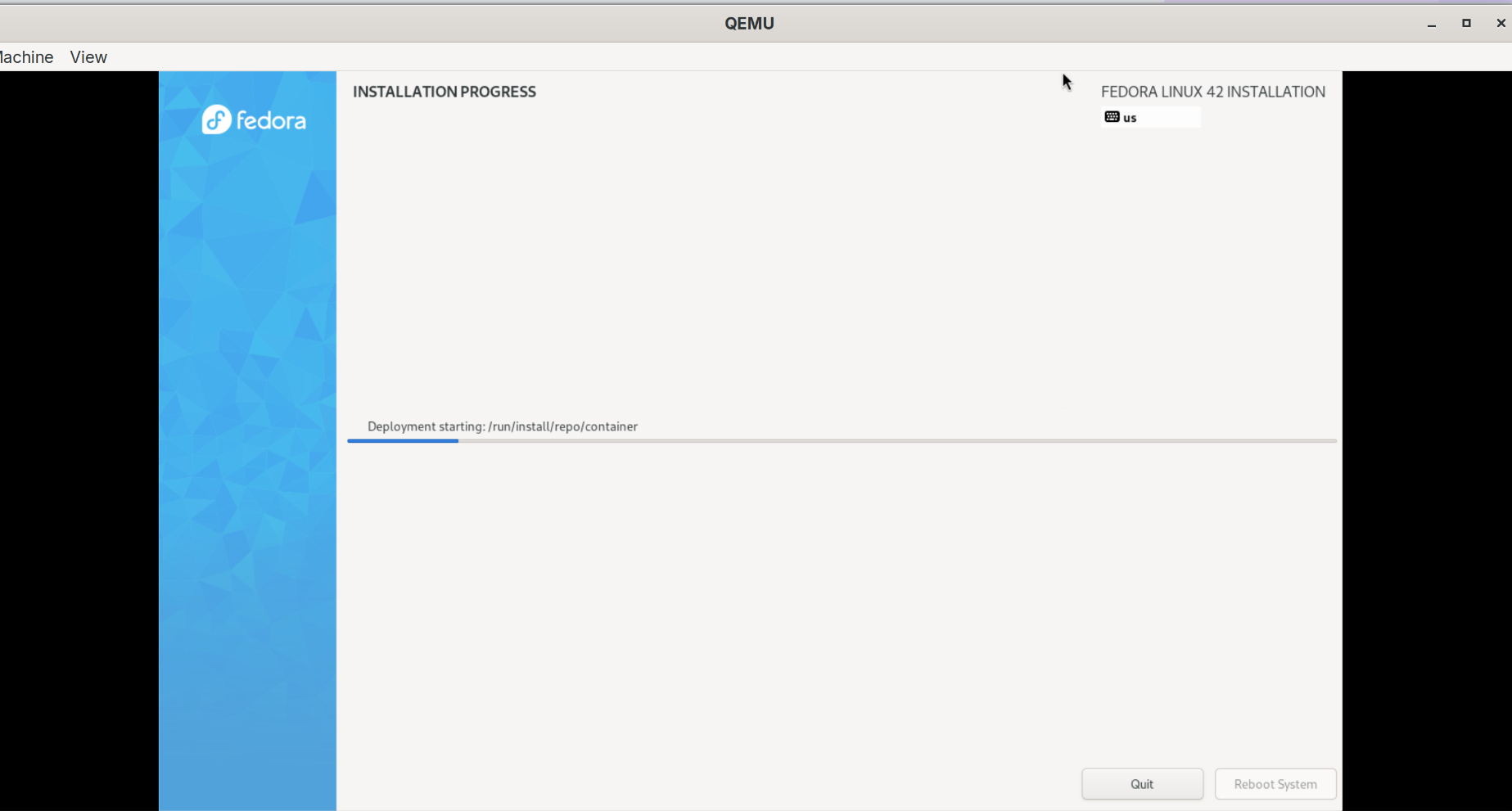
After installation, we can start the VM and verify that the system is indeed a Fedora Silverblue.
qemu-system-x86_64 -m 8G -cpu host -smp 4 -boot d -hda vm_disk.qcow2 -netdev user,id=mynet0 -device e1000,netdev=mynet0 -serial stdio -enable-kvm
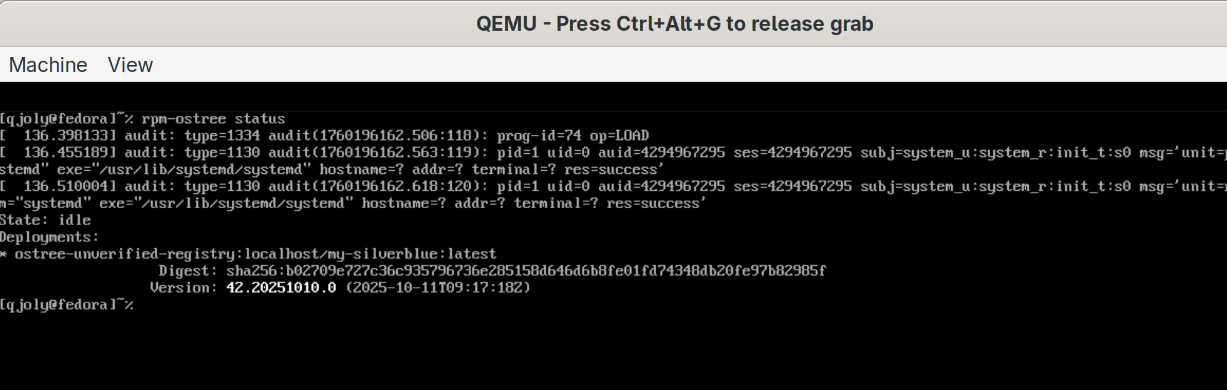
We now have our Fedora Silverblue VM with the qjoly user that we defined in the Containerfile. It clearly shows that we installed it from a Bootc image pointing to localhost/my-silverblue:latest (this information will be important later 😉).
We won’t cover the second option (switching an existing Silverblue to an OCI image) in this article, but it’s also possible with the bootc switch command.
Now, what I can do is push this image to a self-hosted image registry (with Harbor for example) and make this image accessible. There are 2 reasons why I want to do this:
- To generate my installation images from anywhere and version them on Harbor.
- To deploy this image on remote servers using
bootc switch(on official Silverblue images) orbootc upgrade(on our servers deployed with Bootc).
It’s actually this second reason that interests me the most. Indeed, deploying is good, thinking about updates is better. With Bootc, we can imagine a workflow where we build a new OCI image with updates and ask remote servers to switch to this new image.
Updates with Bootc and OSTree
I’m going to add a CI/CD pipeline (Github Actions) that will build a new OCI image every time I push a change to my Containerfile. Then, I’ll push this image to my Harbor registry.
By installing a VM from this new image, we can verify that everything works as expected.
[qjoly@fedora]~% rpm-ostree status
State: idle
Deployments:
●  ostree-unverified-registry:harbor.cortado.thoughtless.eu/bootc/server:main
                   Digest: sha256:5638b6581830be13c9ae418c5d1587f36c7f99b3860326fa7b163bef70236438
                  Version: 42.20250921.0 (2025-09-21T19:04:38Z)
I can install an additional package (for example cowsay) using rpm-ostree and restart the virtual machine to apply the changes.
[qjoly@fedora]~% rpm-ostree status
State: idle
Deployments:
● ostree-unverified-registry:harbor.cortado.thoughtless.eu/bootc/server:main
                   Digest: sha256:5638b6581830be13c9ae418c5d1587f36c7f99b3860326fa7b163bef70236438
                  Version: 42.20250921.0 (2025-09-21T19:04:38Z)
          LayeredPackages: cowsay

  ostree-unverified-registry:harbor.cortado.thoughtless.eu/bootc/server:main
                   Digest: sha256:5638b6581830be13c9ae418c5d1587f36c7f99b3860326fa7b163bef70236438
                  Version: 42.20250921.0 (2025-09-21T19:04:38Z)
We’re good! Now, let’s imagine I want to point to a new image, for example harbor.cortado.thoughtless.eu/bootc/server:add-nginx which contains nginx.
[qjoly@fedora]~% sudo bootc switch harbor.cortado.thoughtless.eu/bootc/server:add-nginx
Fetched layers: 0 B in 0 seconds (0 B/s)
Deploying: done (8 seconds) Pruned images: 0 (layers: 0, objsize: 36.9 MB)
Pruned images: 0 (layers: 0, objsize: 36.9 MB)
Queued for next boot: harbor.cortado.thoughtless.eu/bootc/server:add-nginx
  Version: 42.20250920.0
  Digest: sha256:bb6169309e6c0d728f7a726330360b505bd2e60931f86c38b81c773291f4daf0
After reboot, we see that nginx is indeed installed… but cowsay is gone!
[qjoly@fedora]~% which nginx
/usr/bin/nginx
[qjoly@fedora]~% cowsay
zsh: command not found: cowsay
If I want to reinstall it, I can do so with rpm-ostree install cowsay and it will be added to the new image… but if I do that, I’ll have drift between my OCI image generated by CI/CD and the state of my virtual machine. This isn’t desirable because bootc delivers by default a bootc-fetch-apply-updates.service service that will periodically check if a new image is available and automatically switch to it to keep the system up to date (it’s a systemd timer that runs every 4 hours by default and will launch the bootc upgrade --apply --quiet command).
But when we’re in a drift state, we can’t apply updates at the risk of losing manually installed packages. This is what bootc will indicate to us at login:
qjoly@192.168.1.35's password:
Last login: Sat Oct 11 15:55:27 2025 from 192.168.1.181
[systemd]
Failed Units: 1
  bootc-fetch-apply-updates.service
[qjoly@fedora ~]$ journalctl -u bootc-fetch-apply-updates.service
Oct 11 15:56:05 fedora systemd[1]: Starting bootc-fetch-apply-updates.service - Apply bootc updates...
Oct 11 15:56:05 fedora bootc[1252]: error: Upgrading: Deployment contains local rpm-ostree modifications; cannot upgrade via bootc. You can run `rpm-ostree reset` to undo the modifications.
Oct 11 15:56:05 fedora systemd[1]: bootc-fetch-apply-updates.service: Main process exited, code=exited, status=1/FAILURE
Oct 11 15:56:05 fedora systemd[1]: bootc-fetch-apply-updates.service: Failed with result 'exit-code'.
Oct 11 15:56:05 fedora systemd[1]: Failed to start bootc-fetch-apply-updates.service - Apply bootc updates.
The solution is not to install packages manually with rpm-ostree but to always go through generating a new OCI image with the desired packages. This keeps a consistent state between the image and the deployed system. Let’s generate a new image with cowsay and push it to Harbor so the update service can retrieve it.
FROM quay.io/fedora/fedora-bootc:latest

# -- Package installation --
## Enable RPM Fusion repositories
## https://rpmfusion.org/
RUN dnf install -y https://mirrors.rpmfusion.org/free/fedora/rpmfusion-free-release-$(rpm -E %fedora).noarch.rpm https://mirrors.rpmfusion.org/nonfree/fedora/rpmfusion-nonfree-release-$(rpm -E %fedora).noarch.rpm

ENV BASE_PKG="tmux unzip vim htop qemu-guest-agent @container-management @hardware-support zsh rsync nginx cowsay"
# We add cowsay
RUN dnf install -y ${BASE_PKG} && \
    dnf clean all

# -- User setup --
ARG USERNAME
ARG PASSWORD

RUN groupadd -g 1000 ${USERNAME} \
    && useradd -m -u 1000 -g 1000 -G wheel -s /bin/zsh -K MAIL_DIR=/dev/null ${USERNAME} \
    && echo "${USERNAME}:${PASSWORD}" | chpasswd \
    && mkdir -p /home/${USERNAME} \
    && chown ${USERNAME}:${USERNAME} /home/${USERNAME} \
    && chmod 700 /home/${USERNAME}

RUN echo VARIANT="QJoly server" && echo VARIANT_ID=com.github.qjoly.bootc-server >> /usr/lib/os-release

# -- Finalize container setup --
RUN bootc container lint
After an rpm-ostree reset to cancel local modifications, the update service will be able to apply the new image automatically at the next check (every 4 hours by default).
[qjoly@fedora ~]$ rpm-ostree status
State: idle
Deployments:
● ostree-unverified-registry:harbor.cortado.thoughtless.eu/bootc/server:add-nginx
                   Digest: sha256:5638b6581830be13c9ae418c5d1587f36c7f99b3860326fa7b163bef70236438
                  Version: 42.20250921.0 (2025-09-21T19:04:38Z)

  ostree-unverified-registry:harbor.cortado.thoughtless.eu/bootc/server:add-nginx
                   Digest: sha256:5638b6581830be13c9ae418c5d1587f36c7f99b3860326fa7b163bef70236438
                  Version: 42.20250921.0 (2025-09-21T19:04:38Z)
          LayeredPackages: cowsay
[qjoly@fedora ~]$ journalctl -u bootc-fetch-apply-updates.service
Oct 11 16:06:31 fedora bootc[1326]: Fetching ostree-unverified-registry:harbor.cortado.thoughtless.eu/bootc/server:add-nginx
Oct 11 16:06:32 fedora bootc[1326]: layers already present: 25; layers needed: 45 (1.0 GB)
Oct 11 16:06:32 fedora bootc[1326]: Pulling new image: ostree-unverified-registry:harbor.cortado.thoughtless.eu/bootc/server:add-nginx
Broadcast message from root@fedora (Sat 2025-10-11 16:07:35 UTC):

Initiated by bootc
The system will reboot now!
The system automatically reboots on the new image containing nginx and cowsay without me having to intervene.
To reassure some of you:
- It is possible to disable the automatic update service if you prefer to manage updates manually.
- It is also possible to configure what time the service triggers or disable automatic reboot.
GitOps enthusiasts, you are served!
Conclusion
Bootc and OSTree represent a new way of thinking about Linux system deployment and management. Building on container and versioning concepts, they offer robust and modern solutions to meet the current needs of administrators and developers.
I’ve been planning for some time to send a server to a datacenter to be free to announce my own IPs via BGP. The choice of OS running on this server is important, and I think that with Bootc + OSTree, I have a solution that suits me perfectly (because if I ever lock up the machine during an update, a simple reboot will restore it to a consistent state).
I’m still a beginner with these tools, but I’m very enthusiastic about exploring them further and integrating them into my future projects (I still need to automate encryption by overriding Anaconda’s Kickstart and test deployment on bare-metal).
I hope this article has made you want to learn more about Bootc and OSTree. Feel free to ask me questions or share your experiences in the comments!