Kairos, the immutable OS for deploying Kubernetes
Regular readers of this blog know my deep attachment to Talos. I’m lucky enough to be on the team managing Talos machines at Lucca, I’ve also presented it as part of my VAE, and I even had the chance to be a Sidero ambassador. If you haven’t discovered this incredible solution yet, I can only encourage you to visit their website, read my previous articles, watch recordings of my talks, or approach me on the street and say the T-word — I’ll happily talk about it for hours (at your own risk).
But the entry barrier can seem a bit high for some. It’s important to measure the extent of the paradigm shift that Talos represents, and to carefully weigh the pros and cons before embarking on the Talos adventure (and Kubernetes in general, for that matter).
And if you’re not yet convinced by Talos’s API-Only philosophy, or if you’re looking for an alternative closer to “classic” Linux, then this article is for you — because we’re not going to talk about Talos, but about Kairos, an open-source immutable OS designed to deploy Kubernetes clusters in a simple and efficient way.
Why be interested in Kairos?
Unlike Talos (a minimalist OS without SSH or Systemd), Kairos takes a “classic Linux” approach by allowing you to build an immutable system from existing distributions (openSUSE, Ubuntu, Debian, Rocky Linux, etc.) while preserving their ecosystems. Where Talos provides a turnkey Kubernetes environment, Kairos lets you rely on familiar building blocks like SystemD, k3s/k0s, and Cloud-Init (via Yip).
There are still a few points to note about the distributions supported by Kairos:
- Atomic A/B updates are done through signed images (not via the distribution’s package manager).
- The OS is read-only, which prevents any configuration drift (so goodbye to
apt-get installoryum install) — we’ll come back to this later. - Automation workflows inherit from Cloud-Init (actually a custom reimplementation called Yip) and OCI pipelines, which simplifies integration with already-tooled environments (CI/CD, GitOps, Proxmox, etc.).
This flexibility makes it an interesting option for teams that want the benefits of immutability without giving up a Linux distribution they already know.
Immutability with Kairos
The OS is distributed as a signed OCI container image that installs in read-only mode on a dual-partition system (active and passive). During an update, the new version is written to the inactive partition before the bootloader switches over, enabling an immediate rollback if the new image causes problems (A/B system).
The official docs describe the following directory tree:
/usr/local - persistent ( partition label COS_PERSISTENT)
/oem - persistent ( partition label COS_OEM)
/var - ephemeral
/etc - ephemeral
/srv - ephemeral
/ immutable
Only the COS_PERSISTENT and COS_OEM partitions survive redeployments; the rest is rebuilt at each boot, which prevents configuration drift. The root image can be built locally or pulled directly from an OCI registry, and upgrades go through sudo kairos-agent upgrade --source <type>:<address>, which pulls the artifact, verifies its signature, syncs the passive partition, and reboots.
This partitioning, combined with artifact validation described in the Kairos architecture container documentation, allows reproducible updates to be applied without worrying about a node’s historical configuration.
Kairos Configuration
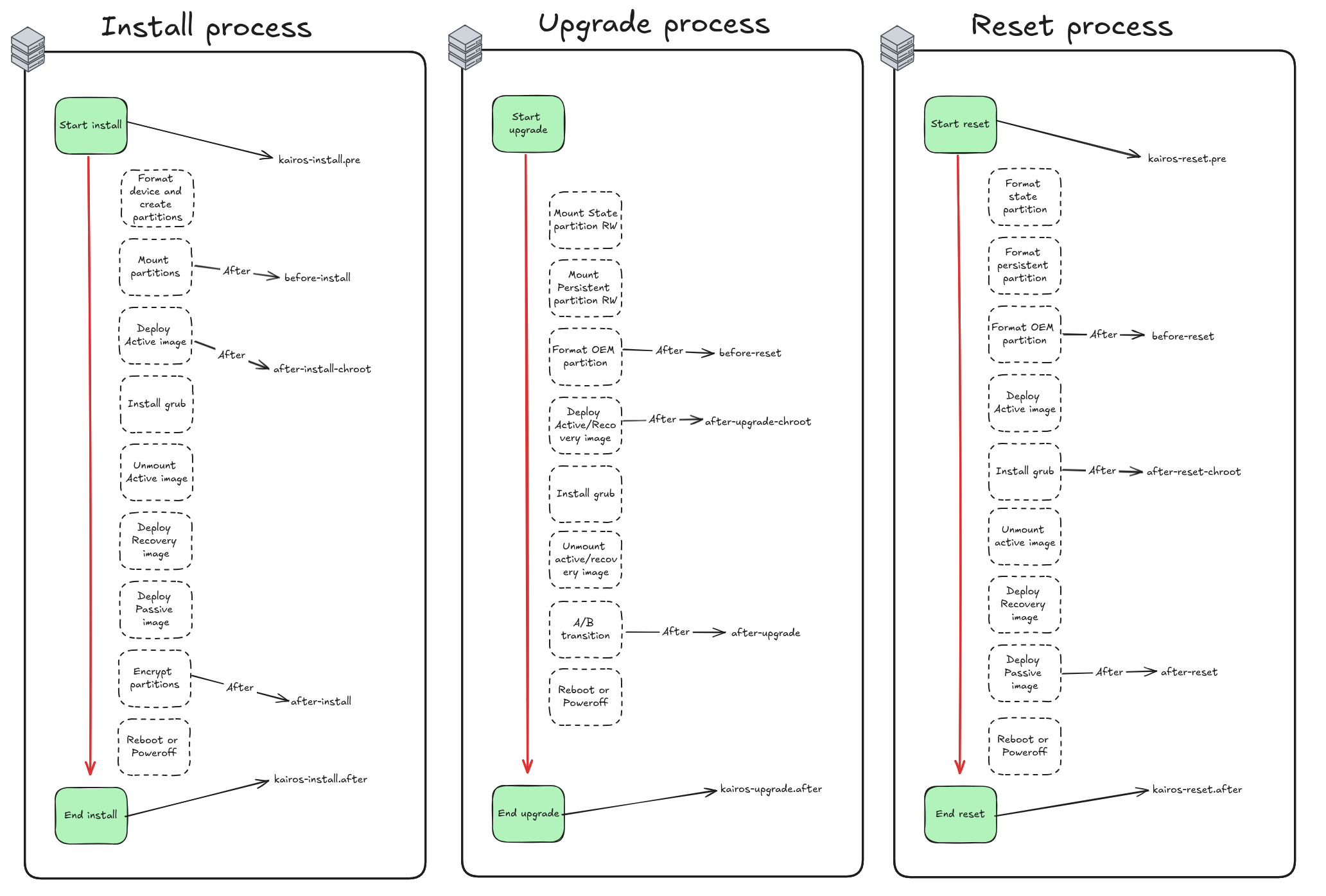
Kairos uses a “stages” system to organize the different configuration and installation steps. Each stage can contain multiple actions that will be executed in a specific order. We also have the ability to define actions during specific boot phases (initramfs, boot, post-boot, etc.).
name: "Disable QEMU tools"
stages:
  boot.after:
    - name: "Disable QEMU"
      if: |
        grep -iE "qemu|kvm|Virtual Machine" /sys/class/dmi/id/product_name && \
        ( [ -e "/sbin/systemctl" ] || [ -e "/usr/bin/systemctl" ] || [ -e "/usr/sbin/systemctl" ] || [ -e "/usr/bin/systemctl" ] )
      commands:
        - systemctl stop qemu-guest-agent
Here for example, we disable the qemu-guest-agent service during the boot.after phase if the machine is detected as a QEMU/KVM VM. Being able to run conditional actions at each boot stage is a real plus for the flexibility Kairos brings (although it can lead to somewhat verbose configurations if you overuse conditions).
Deploying a Kubernetes cluster with Kairos - the dirty but easy way
Since Kairos is compatible with both k3s and k0s, I started with the k0s part, my favorite (mainly because I find k3s bundles too many unnecessary components like Traefik, Flannel…).
#cloud-config

users:
  - name: "kairos"
    groups: [ "admin", "wheel" ]
    ssh_authorized_keys:
     - github:qjoly

# enable debug logging
debug: true

k0s:
  enabled: true
Being able to specify my SSH keys directly via GitHub is a real plus — I appreciate this feature a lot.
[root@localhost k0s]# k0s kubectl get nodes -A
No resources found
[root@localhost k0s]# k0s token create --role=worker
H4sIAAAAAAAC/2xVUY+rOtJ8n1+RP3DOtUOY7ybS97AkdggJzsG47eA3sDmTgCEMYRKG1f771eTOlXalfWt3taqsVqsq7y6y7G+Xa7ua3fGLcR+3oexvq5cfs+969TKbzWam7IfL74vJh/JH/jGcr/1l+Pxh8yFfzQ4pGg4pXnOwkbgEGy4jSEFHCaLAnxga1jWOUuABJ2yTKNlpRL0UokAjJ5MpGRUYLMiZxuvlL0l5VYAMJabveet6W1luEecKukOBuygPdSVqyjk89omjgUWWcGlZ4miYCCo50IUA/xxj3Sl33lvZZdCMVSnou5I80KC9OHRHSaQnVNeWgCE9dYyT6Mxb8yjfur8x/Z+YgKgtiX5PpFxr5KukpkwSfrIbqgup/azBKqZdJk5cx7X09NzSHHAQE7sBj4Zrx6KsYgRArhNJZQIEpRARi+hzNkX0/rUTAOZnTcSN5KFAy7Vxu56DzGIYiVIUZVVAjDKLrHITR9neSLo54LfPBNlfJjzH8anzchzsikmnqjWj/tqhcIne4rw8Ra9ivpiKivd24o+C6GE/p43YyFZT/mqc5XZi2/IfnUhldGWYNUomE2yvD14Pj+N2fOSKy7h59HElE1AdKy/LX7zinajMCGqJcnDrWEQsqyxXMGSMSJrK4GK3UbRu0L0g485u6sWR8rulDNj61h8JPxmgcCT+yZBlm9KgTrxkwbe1n6Nbb0A2UPtH3pwfMZE8EbFvkPw8SnaPp93egr6YuQ8qjHu1jR/p1gpL6IetZSZD7pSzUYEcHLDLCs9CLNjeVmcUy47Dhr1niL4acn6IudwaGT1sHR3zpNuKGn1KTIcipO/SScUB76Ryk6p4qJEbjeu4FMHVeme/VEvN5sm9bGlkKuoViL4zr9smyrKkpgGfdzyvo2Bd44ARG8RS1jy0NLksPQAZWOTWSdMFQKJWOL2DGq8TlS04RJAADwDe7gJ2D47IKBUnGtNTUkdpvJUeqx/7vOKfUr55mhjf1I8FnBgIEQQgLOQ1PSaN7Y069zkY307B1w1OvKaBQCz40pdzMlfODaqRY9G6KSZ8k7x1icXXT10/MNtGoYLdxJuI5RDFAr/5ijBXKCrj7XizJ+KxOfMk6B7q5btouV82vijr8ZKizpPQ5WWzvAskydrtcOakyD37cZhYyzfn/Khcz7FtgPz5MMA6A284Bz6PcYwkPl8MdNoAH/dTMHKUjWrDkPZYppU76kbeUoA9qx3WJPqI59eFFTrOv7zIC3oJQ2wpW+v2jKwajiXxfx2QDaAeFYQ7T06BLtRwNaGNJN0hc7kttKKv1ulTmXTZYdL+Yd41ObIXUWMukO8X4M8BZLL3uk2GEk/ONSuJvtmNOwkXvKabBItKZ6ZyoZTnHgTnWmHJ6vFkNlSvKx0Wm9jjjh1Uyxvj3BG87iMGSssGjfnkzjJ0qamsZi7qDMlwTnCWhjaTWz/UJJv0iTsD0aupeMUbdi2qeL+f80qC9H4JtP/2Zirq5C1BMpXEbVNggSTw9OVDcv3/p8Hfyv5e9qvZeRi62+qPP/By/hO//vkT/8Sv3up1sfBeZrM2b8rVrEa3F3Nth3Ic/gqKv+rvoPhOjefUV+Pj9nx9FKUrhx/F9Trchj7v/pvto+/LdvjxN9OzWV9au5qtr+3vy9tL15e/y75sTXlbzf75r5cv1qf4N8n/oH8KP78wXOuyXc16m9+v/c939zn69e9F/3+mWZb48fLvAAAA//+MBOjgBAcAAA==
Interestingly, the generated token is actually a compressed and base64-encoded kubeconfig file. If we decode it, we get something like this:
# After `echo $token | base64 -D | gunzip -`
apiVersion: v1
clusters:
- cluster:
    certificate-authority-data: LS0tLS1CRUdJTiBDRVJUSUZJQ0FURS0tLS0tCk1JSURBRENDQWVpZ0F3SUJBZ0lVQzQxWUc1TEhFMC9PVFRjbUVHV1FqanlrdjdRd0RRWUpLb1pJaHZjTkFRRUwKQlFBd0dERVdNQlFHQTFVRUF4TU5hM1ZpWlhKdVpYUmxjeTFqWVRBZUZ3MHlOVEV3TWpneU1USXpNREJhRncwegpOVEV3TWpZeU1USXpNREJhTUJneEZqQVVCZ05WQkFNVERXdDFZbVZ5Ym1WMFpYTXRZMkV3Z2dFaU1BMEdDU3FHClNJYjNEUUVCQVFVQUE0SUJEd0F3Z2dFS0FvSUJBUUN5YmJRcVRHT09CclIrRUVYMUxEWWF0YjBEcWc4YjlzR0YKcVFDL1gyQ0dPcHhMMXp3a1BIbzZSWncxZnlrdTlQZG1aeXJ6T24zbjRrdzRwbEZtK2FmTDVnZFR6cldRdzNGeApTSVJoN1NmWVQzUGowRktwOGxwaWRVMmwrMjVQUWpNei9PRjRpTjcxUW90aUlCMTJNYjdRWUtYNEVFSVBidGJJCm0vbExIdDk4OFRvdFNUNCsrOERXcUFUOE5XcE9nSFBkQ3Q4RGk5a0srcUVmUk5ORmhwMEVRQTM5c0VyOVNvMzIKdUZic25UWHMrWGMwSGdTdEFudkVYVHRlWldJb0lUL1lYb3dUMTNKdjh0MVpRUDNqY0F6cEhwT2VGcVJwdkJOaQpGTk0yV1FtbHFqVlVWRU1IVWlzWjRHZ0lxclpRVTBod3h5eW9ZN2QvenFJcjF3b0FqN3pGQWdNQkFBR2pRakJBCk1BNEdBMVVkRHdFQi93UUVBd0lCQmpBUEJnTlZIUk1CQWY4RUJUQURBUUgvTUIwR0ExVWREZ1FXQkJSMGV3NkwKajRyVVg3ZEc5ckw4UXNUTTBBUTdUakFOQmdrcWhraUc5dzBCQVFzRkFBT0NBUUVBV2E2WlltWmVxbnlzMERDQgpQd1oyZkw1NGJHWUIzRmJNaUJMT1g5WENlbWFVMGxsdXE3N2N3VUZrUk9qTnR5em5TekxiS0p3VUpaem9vT0VEClI1YlVTa3duLzNnRDhaOWlrR1dmUE8wcUNpcUg1aUR2M1M0V1hicUpZcURxKzBxR0YxWDN0Z3NYZWlOZmVsSUUKNkl1ZEJuM2o4dTZMaVJUS3BrVUtMdFNCZnh0dWtOeE5PL0dBUkxWUHI3VzBZbWtocHdJVFI0cis4ZWF6dlZXeQpYLzZ5L2pma0diTk1RT055bU52UUVQK3pDY0Q3V2ZNeEZsdDlXTlB6SDQ1TjZYcjlHVVhrUTRRZW1VNkxXcDFZCjZHbDM3RlNLWnRmcllOU3puMUFFem0xazlhVHlScjdZNlJpcEY1aE1YSHdYVG5HZEYzZXRlcUJ6cjRjRmNobjMKK2RjVUV3PT0KLS0tLS1FTkQgQ0VSVElGSUNBVEUtLS0tLQo=
    server: https://192.168.1.163:6443
  name: k0s
contexts:
- context:
    cluster: k0s
    user: kubelet-bootstrap
  name: k0s
current-context: k0s
kind: Config
preferences: {}
users:
- name: kubelet-bootstrap
  user:
    token: rdavor.qlyx5kf4r7cm9e1w
From there, we just need to inject it into our Cloud-Init so that the node automatically joins the k0s cluster as a worker.
stages:
  initramfs:
    - name: "Setup hostname"
      hostname: "node-{{ trunc 4 .MachineID }}"
users:
  - name: "kairos"
    groups: [ "admin", "wheel" ]
    ssh_authorized_keys:
     - github:qjoly

k0s-worker:
  enabled: true
  args:
    - --token-file /etc/k0s/token

write_files:
  - path: /etc/k0s/token
    permissions: 0644
    content: |
        H4sIAAAAAAAC/2xVUY+rOtJ8n1+RP3DOtUOY7ybS97AkdggJzsG47eA3sDmTgCEMYRKG1f771eTOlXalfWt3taqsVqsq7y6y7G+Xa7ua3fGLcR+3oexvq5cfs+969TKbzWam7IfL74vJh/JH/jGcr/1l+Pxh8yFfzQ4pGg4pXnOwkbgEGy4jSEFHCaLAnxga1jWOUuABJ2yTKNlpRL0UokAjJ5MpGRUYLMiZxuvlL0l5VYAMJabveet6W1luEecKukOBuygPdSVqyjk89omjgUWWcGlZ4miYCCo50IUA/xxj3Sl33lvZZdCMVSnou5I80KC9OHRHSaQnVNeWgCE9dYyT6Mxb8yjfur8x/Z+YgKgtiX5PpFxr5KukpkwSfrIbqgup/azBKqZdJk5cx7X09NzSHHAQE7sBj4Zrx6KsYgRArhNJZQIEpRARi+hzNkX0/rUTAOZnTcSN5KFAy7Vxu56DzGIYiVIUZVVAjDKLrHITR9neSLo54LfPBNlfJjzH8anzchzsikmnqjWj/tqhcIne4rw8Ra9ivpiKivd24o+C6GE/p43YyFZT/mqc5XZi2/IfnUhldGWYNUomE2yvD14Pj+N2fOSKy7h59HElE1AdKy/LX7zinajMCGqJcnDrWEQsqyxXMGSMSJrK4GK3UbRu0L0g485u6sWR8rulDNj61h8JPxmgcCT+yZBlm9KgTrxkwbe1n6Nbb0A2UPtH3pwfMZE8EbFvkPw8SnaPp93egr6YuQ8qjHu1jR/p1gpL6IetZSZD7pSzUYEcHLDLCs9CLNjeVmcUy47Dhr1niL4acn6IudwaGT1sHR3zpNuKGn1KTIcipO/SScUB76Ryk6p4qJEbjeu4FMHVeme/VEvN5sm9bGlkKuoViL4zr9smyrKkpgGfdzyvo2Bd44ARG8RS1jy0NLksPQAZWOTWSdMFQKJWOL2DGq8TlS04RJAADwDe7gJ2D47IKBUnGtNTUkdpvJUeqx/7vOKfUr55mhjf1I8FnBgIEQQgLOQ1PSaN7Y069zkY307B1w1OvKaBQCz40pdzMlfODaqRY9G6KSZ8k7x1icXXT10/MNtGoYLdxJuI5RDFAr/5ijBXKCrj7XizJ+KxOfMk6B7q5btouV82vijr8ZKizpPQ5WWzvAskydrtcOakyD37cZhYyzfn/Khcz7FtgPz5MMA6A284Bz6PcYwkPl8MdNoAH/dTMHKUjWrDkPZYppU76kbeUoA9qx3WJPqI59eFFTrOv7zIC3oJQ2wpW+v2jKwajiXxfx2QDaAeFYQ7T06BLtRwNaGNJN0hc7kttKKv1ulTmXTZYdL+Yd41ObIXUWMukO8X4M8BZLL3uk2GEk/ONSuJvtmNOwkXvKabBItKZ6ZyoZTnHgTnWmHJ6vFkNlSvKx0Wm9jjjh1Uyxvj3BG87iMGSssGjfnkzjJ0qamsZi7qDMlwTnCWhjaTWz/UJJv0iTsD0aupeMUbdi2qeL+f80qC9H4JtP/2Zirq5C1BMpXEbVNggSTw9OVDcv3/p8Hfyv5e9qvZeRi62+qPP/By/hO//vkT/8Sv3up1sfBeZrM2b8rVrEa3F3Nth3Ic/gqKv+rvoPhOjefUV+Pj9nx9FKUrhx/F9Trchj7v/pvto+/LdvjxN9OzWV9au5qtr+3vy9tL15e/y75sTXlbzf75r5cv1qf4N8n/oH8KP78wXOuyXc16m9+v/c939zn69e9F/3+mWZb48fLvAAAA//+MBOjgBAcAAA==
The small problem with this setup is that the API-Server endpoint is hardcoded directly into the token. If I ever want to specify a load balancer or a VIP, I have to decode it, modify it, and re-encode it. The workflow is therefore not optimal and automation is painful.
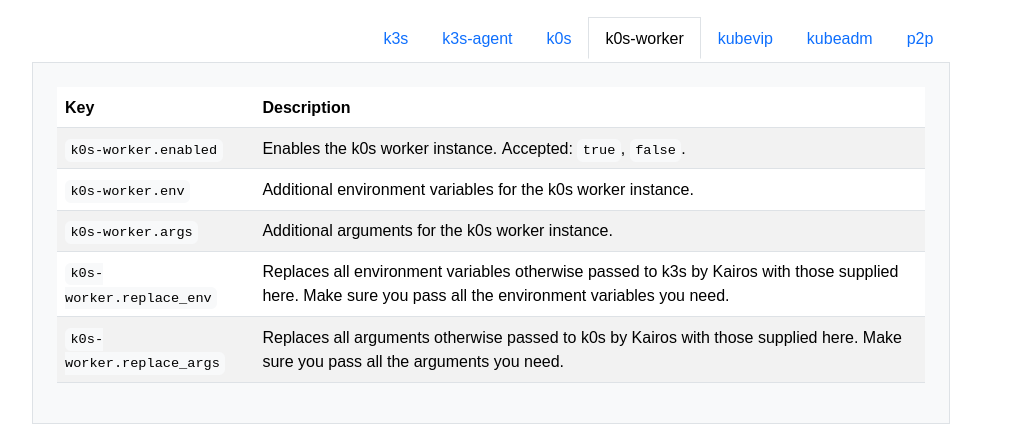
Fortunately, there is another method we’ll see a bit later (spoiler: don’t get too attached to k0s, we’ll need to migrate to k3s for this method). But before that, we’ll need to tackle another form of automation with Kairos: Cloud-Init.
Cloud-Init with Kairos
Let me clarify an important point first: Kairos does not use Cloud-Init as we typically know it. It actually uses a custom integration called yip. Thanks to this project, the configuration doesn’t rely solely on shell scripts and has a simpler format to write (thanks to a large abstraction managed by the kairos agent).
This is where I’ll use Terraform OpenTofu to avoid having to SSH into my Proxmox every time I want to deploy a new node.
Here is a minimal example, but you can find the full code on my GitHub repository.
resource "proxmox_virtual_environment_vm" "kairos" {
  count       = var.vm_count
  name        = "${var.vm_name_prefix}-${count.index + 1}"
  description = "Kairos VM ${count.index + 1}"
  tags        = ["terraform", "Kairos"]

  node_name = var.node_name

  agent {
    enabled = true
  }

  stop_on_destroy = true

  boot_order = ["scsi0", "ide3"]

  startup {
    order      = "${3 + count.index}"
    up_delay   = "60"
    down_delay = "60"
  }

  cdrom {
    file_id    = var.kairos_iso_file_id
  }

  cpu {
    cores        = 2
    type         = "x86-64-v2-AES"
  }

  memory {
    dedicated = 3072
    floating  = 2048
  }

  disk {
    datastore_id = "local-lvm"
    interface    = "scsi0"
  }

  network_device {
    bridge = "vmbr0"
  }

  operating_system {
    type = "l26"
  }

  serial_device {}
  initialization {
    user_data_file_id = proxmox_virtual_environment_file.cloud_init_userdata.id
  }
}

resource "proxmox_virtual_environment_file" "cloud_init_userdata" {
  content_type = "snippets"
  datastore_id = "local"
  node_name = var.node_name

  source_raw {
    data = <<-EOF
    #cloud-config
    stages:
        initramfs:
            - name: "Setup hostname"
              hostname: "node-{{ trunc 4 .MachineID }}"

    users:
      - name: "kairos"
        groups: [ "admin", "wheel" ]
        ssh_authorized_keys:
        - github:qjoly
    debug: true

    k0s:
        enabled: true

    install:
        reboot: true
        auto: true

    EOF

    file_name = "user-data-cloud-config.yaml"
  }
}
Once the code is applied, the VMs are automatically created in Proxmox, boot from the Kairos ISO, retrieve the Cloud-Init via the virtual CD-ROM, then install themselves and reboot.
Tip
If your configuration is invalid, Kairos won’t let you know at boot time. You can however verify the validity of your Cloud-Init using the command below.
kairos validate /oem/95_userdata/userdata
We now have a simple way to create our Kairos VMs automatically by passing a configuration via Cloud-Init. But how do we automate a k0s/k3s worker node join without having to manage a hardcoded token in the Cloud-Init?
Deploying a Kubernetes cluster with Kairos - the right way
There is one component I haven’t mentioned yet: edgevpn. It’s a tool that allows creating virtual private networks (VPN) between the different nodes of your Kubernetes cluster.
The feature we’re interested in is node auto-discovery via a DHT (Distributed Hash Table) service coupled with mDNS (Multicast DNS).
P2P network and auto-discovery
Kairos relies on a homegrown P2P network so that nodes discover and coordinate with each other automatically, without an external orchestration server. By enabling auto.enable, each machine joins a libp2p overlay driven by EdgeVPN using a shared token (which embeds the secrets necessary for bootstrapping).
Concretely, the mesh goes through three steps:
- discovery via mDNS on LAN or DHT for distributed environments;
- formation of a gossip network that stores a shared ledger (membership tokens, topology, metadata);
- establishment of full connectivity through an optional VPN interface.
Once the tunnel is up, Kairos automatically distributes VirtualIPs, which facilitates both Kubernetes API exposure and the use of KubeVIP. This same overlay can be reused by your workloads: just target the virtual interface to benefit from end-to-end encryption without exotic network configuration.
For more hybrid environments, Entangle controllers even allow extending this mesh into existing clusters to federate services. The full mechanics are detailed in the Kairos network documentation, but the key idea remains the same: zero manual configuration, add/remove nodes on the fly, and a resilient network layer designed for the edge.
Auto-discovery with Kairos
Thanks to these two technologies, machines on the same local network can share key-value information without needing a centralized server. Kairos has leveraged these features to allow nodes in a Kubernetes cluster to automatically discover each other and self-configure without manual intervention. However, this is only compatible with k3s for now.
To do this, simply specify it in the configuration:
auto:
  enable: true

p2p:
  network_token: "${var.p2p_network_token}" # Token shared between cluster nodes
  auto:
    ha:
      enable: true
      master_nodes: 2
In master_nodes, we specify the number of master nodes our machine will wait for before proceeding with the Kubernetes cluster installation (so 2, plus itself, for a total of 3).
If there are already enough master nodes on the local network, the machine will directly proceed with installation as a worker node.
If you have multiple clusters on the same local network, you’ll need to differentiate them using different network_id: "" values.
By applying this new configuration in our Cloud-Init (via a quick tofu apply in my case), the nodes install automatically and join the Kubernetes cluster without any intervention from me (no token to manage, no IP to specify, nothing at all).
Here is an excerpt from the kairos-agent logs during the auto-discovery and installation process:
Nov 02 11:01:35 node-1c67 kairos-provider[1346]: Applying role 'auto'
Nov 02 11:01:35 node-1c67 kairos-provider[1346]: Role loaded. Applying auto
Nov 02 11:01:35 node-1c67 kairos-provider[1346]: Active nodes:[12D3KooWC5J67j9ZBdD43gvHUJVtK3GdkFZgJqtCp44kLibZZrfb 12D3KooWMJEa4Pj51Tyh1SJgQuoqzdi2jxu9GaZN>
Nov 02 11:01:35 node-1c67 kairos-provider[1346]: Advertizing nodes:[71439af32f8f4ded89df8ee6e04c0930-node-7143 c36e5f71e646449eaf1182d7a766a058-node-c36e fe>
Nov 02 11:01:35 node-1c67 kairos-provider[1346]: <1c67200d175e43809a806488aedfc940-node-1c67> not a leader, leader is 'f0a5a8a0f0c04cde8c3181d6caa5fcc8-node>
Nov 02 11:01:35 node-1c67 kairos-provider[1346]: Roles assigned
Nov 02 11:01:35 node-1c67 kairos-provider[1346]: Applying role 'master/ha'
Nov 02 11:01:35 node-1c67 kairos-provider[1346]: Role loaded. Applying master/ha
Nov 02 11:01:35 node-1c67 kairos-provider[1346]: Starting Master(master/ha)
Nov 02 11:01:35 node-1c67 kairos-provider[1346]: Checking role assignment
Nov 02 11:01:35 node-1c67 kairos-provider[1346]: Determining K8s distro
Nov 02 11:01:35 node-1c67 kairos-provider[1346]: Verifying sentinel file
Nov 02 11:01:35 node-1c67 kairos-provider[1346]: Checking HA
After that, all that’s left is to verify that everything is working correctly.
[root@node-1c67 ~]# kubectl get nodes
NAME                 STATUS   ROLES                AGE     VERSION
node-1c67            Ready    control-plane,etcd   8m48s   v1.34.1+k3s1
node-7143            Ready    control-plane,etcd   9m49s   v1.34.1+k3s1
node-c36e-b2fa755e   Ready    <none>               9m5s    v1.34.1+k3s1
node-f0a5            Ready    control-plane,etcd   8m44s   v1.34.1+k3s1
node-feb6-0d4a2413   Ready    <none>               9m8s    v1.34.1+k3s1
And there we go — a fully functional Kubernetes cluster deployed automatically with Kairos, without having to manage tokens or manual interventions. Pretty neat, isn’t it?
Kairos Operator
But once the cluster is in place, how do we manage updates and Day-2 operations? That’s where the Kairos Operator comes in!
Since version 3.5, it’s clearly the recommended method for driving upgrades and Day-2 operations directly from Kubernetes. The principle is simple: two CRDs, NodeOp for executing anything on a node (Kairos or not), and NodeOpUpgrade which encapsulates ready-to-use Kairos upgrade scripts.
Deployment doesn’t require much:
kubectl apply -k https://github.com/kairos-io/kairos-operator/config/default
Once the operator is in place, all Kairos nodes automatically receive the label kairos.io/managed=true, which is handy for targeting only the immutable infrastructure in a hybrid cluster. You can also embed the operator directly in the installation by adding the official bundle:
bundles:
  - targets:
      - run://quay.io/kairos/community-bundles:kairos-operator_latest
Note
A quick aside: bundles are extensions that add extra files to the Kairos filesystem. They can contain binaries, scripts, or Kubernetes manifests deployed in the k3s/k0s folders to be automatically applied at startup.
To install a bundle, you can go through the Cloud-Init configuration as shown above, or use the kairos-agent sysext install command which downloads and installs the bundle on the fly (taking an OCI image, an HTTP(S) link, or a local path as argument).
To launch an upgrade, you create a NodeOpUpgrade pointing to the desired Kairos image, with fine-grained control over concurrency or stopping on failure:
apiVersion: operator.kairos.io/v1alpha1
kind: NodeOpUpgrade
metadata:
  name: kairos-upgrade
  namespace: default
spec:
  image: quay.io/kairos/opensuse:tumbleweed-latest-standard-amd64-generic-v3.5.6-k3s-v1.34.1-k3s1
  nodeSelector:
    matchLabels:
      kairos.io/managed: "true"
  concurrency: 1
  stopOnFailure: true
It’s also possible to create custom NodeOp resources to execute arbitrary commands on Kairos nodes. For example, to restart the k3s service on all managed nodes:
apiVersion: operator.kairos.io/v1alpha1
kind: NodeOp
metadata:
  name: example-nodeop
  namespace: default
spec:
  # NodeSelector to target specific nodes (optional)
  nodeSelector:
    matchLabels:
      kairos.io/managed: "true"

  # The container image to run on each node
  image: busybox:latest

  # The command to execute in the container
  command:
    - sh
    - -c
    - |
      echo "Running on node $(hostname)"
      ls -la /host/etc/kairos-release
      cat /host/etc/kairos-release

  # Path where the node's root filesystem will be mounted (defaults to /host)
  hostMountPath: /host
  cordon: true
  drainOptions:
    enabled: true
    force: false
    gracePeriodSeconds: 30
    ignoreDaemonSets: true
    deleteEmptyDirData: false
    timeoutSeconds: 300

  rebootOnSuccess: true
  backoffLimit: 3
  concurrency: 1
  stopOnFailure: true
This is somewhat similar to Kubernetes Jobs, but with the added ability to cordon and drain nodes before executing the command.
Entangle
I absolutely have to open a small parenthesis on Entangle — the Kairos developers created a project to build a mesh between two Kubernetes clusters. The idea: two Kubernetes operators (entangle and entangle-proxy) that recycle the same P2P system (libp2p) to connect Kairos nodes (equivalent to KubeSpan for Talos).

In practice, you start by generating a network_token (the same format as for EdgeVPN, we’ll see that later), then:
- install the CRDs via
helm install kairos-crd kairos/kairos-crds, - deploy
entangleon the clusters you want to connect, - add
entangle-proxyon the “master” cluster that will push or receive remote manifests.
Then everything is managed with simple Kubernetes resources. A Secret embeds the P2P token, and the Entanglement object describes the service to expose:
---
apiVersion: entangle.kairos.io/v1alpha1
kind: Entanglement
metadata:
  name: test
  namespace: default
spec:
   serviceUUID: "foo"
   secretRef: "mysecret"
   host: "127.0.0.1"
   port: "8080"
   inbound: true
   serviceSpec:
    ports:
    - port: 8080
      protocol: TCP
    type: ClusterIP
I won’t go into detail here (it could be the subject of a separate article), but the concept is really interesting for federating distant Kubernetes clusters without headaches.
Conclusion
In the end, I’m quite pleasantly surprised by Kairos, which seems quite promising for anyone wanting to use an Immutable Kubernetes-oriented OS without taking the plunge into API-Only OSes like Talos. Being able to rely on familiar tools (k0s/k3s, Cloud-Init, etc.) while benefiting from a modern approach to immutable infrastructure is very user-friendly.
I also think it’s great that the developers have invested time in the Entangle ecosystem, Kairos Operator, Yip, and Auroraboot (which I haven’t covered for PXE deployment).