Under Bluesky’s hood: the ATProto
It’s been a few years now since I migrated from X to Bluesky. Picking Bluesky happened pretty naturally (I’d already given Mastodon a shot). But other than reading a few papers about where Bluesky came from and its technical stack, I never took the time to dig into what actually happens “behind” Bluesky.
Because indeed, when you think of Bluesky, you see the web interface, the timeline, the likes and followers, the “skeets” (tweets), but behind all that sits a huge building block called ATProto.
In this article, we’re going to take it apart: what it is, why it’s interesting, and how to use it.
But first, a bit of context is in order.
What is ATProto?
ATProto (short for AT Protocol, or Authenticated Transfer Protocol) is an open protocol for building decentralized social networks, launched by Bluesky. The thing to grasp right away: Bluesky is just one application sitting on top of ATProto, a bit like a mail client on top of SMTP. Other apps run on the same protocol, and nothing stops anyone from writing new ones.
If, when someone says “decentralized social network,” you tend to think of Mastodon, that’s normal: it’s built on ActivityPub, the other big protocol in this space (the one behind the fediverse). Both want the same thing but make very different technical bets.
Where Mastodon splits the network into instances that copy from one another, and where an account is welded to its server, Bluesky (ATProto) separates your identity from your host so you can switch servers without losing anything (but we’ll dig into that a bit later).
Who owns what: handle, DID and PDS
Before going further, we need to understand the identity chain. In ATProto, our identity is not our server. That’s a fundamental distinction, and it’s what makes portability possible.
Three objects come into play:
- The handle: a readable name shaped like a domain name (e.g.
une-tasse-de.cafefor me); it’s changeable. - The DID (Decentralized Identifier): your stable, permanent identifier, something like
did:plc:hqnyog7skad6m4aejb2yujxy. It never changes, even if you switch handles or servers. - The PDS: the server that physically hosts your repository. It’s listed inside your DID document, so it too can change.
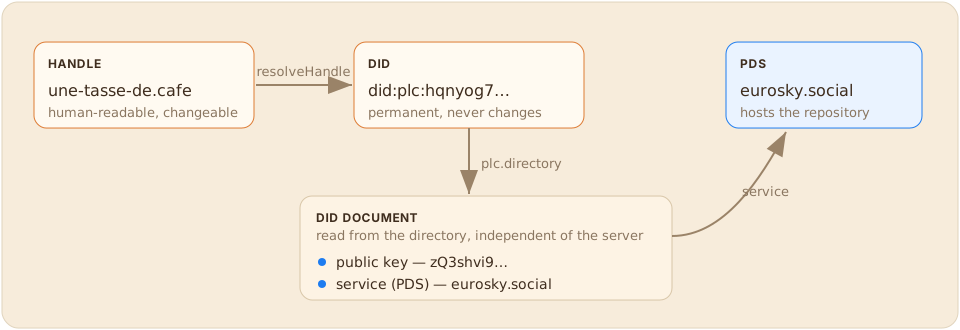
Let’s resolve the handle une-tasse-de.cafe to find its DID:
curl -s "https://bsky.social/xrpc/com.atproto.identity.resolveHandle?handle=une-tasse-de.cafe"
{ "did": "did:plc:hqnyog7skad6m4aejb2yujxy" }
With that DID, we can go read its full document. For a did:plc, it’s published in a dedicated directory, plc.directory:
curl -s "https://plc.directory/did:plc:hqnyog7skad6m4aejb2yujxy"
{
  "@context": [
    "https://www.w3.org/ns/did/v1",
    "https://w3id.org/security/multikey/v1",
    "https://w3id.org/security/suites/secp256k1-2019/v1"
  ],
  "id": "did:plc:hqnyog7skad6m4aejb2yujxy",
  "alsoKnownAs": [
    "at://une-tasse-de.cafe"
  ],
  "verificationMethod": [
    {
      "id": "did:plc:hqnyog7skad6m4aejb2yujxy#atproto",
      "type": "Multikey",
      "controller": "did:plc:hqnyog7skad6m4aejb2yujxy",
      "publicKeyMultibase": "zQ3shvi9RBYFYwfzbkju871YNjv9EDAZ5Cy52PY5nNkQiH215"
    }
  ],
  "service": [
    {
      "id": "#atproto_pds",
      "type": "AtprotoPersonalDataServer",
      "serviceEndpoint": "https://eurosky.social"
    }
  ]
}
This little document tells you everything:
alsoKnownAs: the handle currently associated with the DID (une-tasse-de.cafe)verificationMethod: the account’s public key (zQ3shvi9RBYFYwfzbkju871YNjv9EDAZ5Cy52PY5nNkQiH215)service: the PDS address,https://eurosky.social. That’s where the repository is stored.
Info
As I said above, we can query a public registry to find out who hosts our data (and, for example, ask eurosky to display the tweets I publish on Bluesky). Technically I could migrate my data to another PDS so it represents me instead.
From here on, we have everything we need to talk directly to the PDS: a DID and the server URL.
The repository
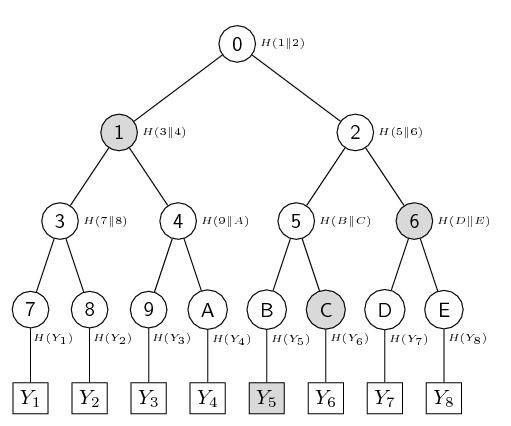
Each account owns exactly one repository on its PDS. This repository is a sorted key → value store, but with a particular structure that’s going to keep us busy for the rest of the article: a Merkle Search Tree.
Let’s start by asking the PDS to describe itself:
PDS="https://eurosky.social"
DID="did:plc:hqnyog7skad6m4aejb2yujxy"
curl -s "$PDS/xrpc/com.atproto.repo.describeRepo?repo=$DID"
{
  "handle": "une-tasse-de.cafe",
  "did": "did:plc:hqnyog7skad6m4aejb2yujxy",
  "didDoc": {
    "@context": [
      "https://www.w3.org/ns/did/v1",
      "https://w3id.org/security/multikey/v1",
      "https://w3id.org/security/suites/secp256k1-2019/v1"
    ],
    "id": "did:plc:hqnyog7skad6m4aejb2yujxy",
    "alsoKnownAs": [
      "at://une-tasse-de.cafe"
    ],
    "verificationMethod": [
      {
        "id": "did:plc:hqnyog7skad6m4aejb2yujxy#atproto",
        "type": "Multikey",
        "controller": "did:plc:hqnyog7skad6m4aejb2yujxy",
        "publicKeyMultibase": "zQ3shvi9RBYFYwfzbkju871YNjv9EDAZ5Cy52PY5nNkQiH215"
      }
    ],
    "service": [
      {
        "id": "#atproto_pds",
        "type": "AtprotoPersonalDataServer",
        "serviceEndpoint": "https://eurosky.social"
      }
    ]
  },
  "collections": [
    "app.bsky.actor.profile",
    "app.bsky.feed.like",
    "app.bsky.feed.post",
    "app.bsky.feed.repost",
    "app.bsky.graph.follow",
    "app.bsky.graph.list",
    "app.bsky.graph.listitem",
    "blog.pckt.publication",
    "chat.bsky.actor.declaration",
    "dev.at-intent.usage",
    "id.sifa.graph.follow",
    "id.sifa.profile.certification",
    "id.sifa.profile.education",
    "id.sifa.profile.externalAccount",
    "id.sifa.profile.position",
    "id.sifa.profile.presentation",
    "id.sifa.profile.presentationDelivery",
    "id.sifa.profile.project",
    "id.sifa.profile.self",
    "id.sifa.profile.skill",
    "sh.tangled.actor.profile",
    "sh.tangled.feed.comment",
    "sh.tangled.feed.star",
    "sh.tangled.graph.follow",
    "sh.tangled.graph.vouch",
    "sh.tangled.knot",
    "sh.tangled.publicKey",
    "sh.tangled.repo",
    "sh.tangled.repo.pull",
    "sh.tangled.repo.pull.status",
    "sh.tangled.spindle",
    "site.standard.publication"
  ],
  "handleIsCorrect": true
}
First observation: this repository doesn’t contain only Bluesky data. You’ll find app.bsky.*, but also tangled, the Git server (sh.tangled.*), an alternative LinkedIn called Sifa (id.sifa.profile.*) and even a blogging platform, pckt (blog.pckt.publication).
We’ll see a bit later how that works, but it’s thanks to ATProto that the apps I use are tied to my PDS (and the PDS has no say over what I store, or why).
Tip
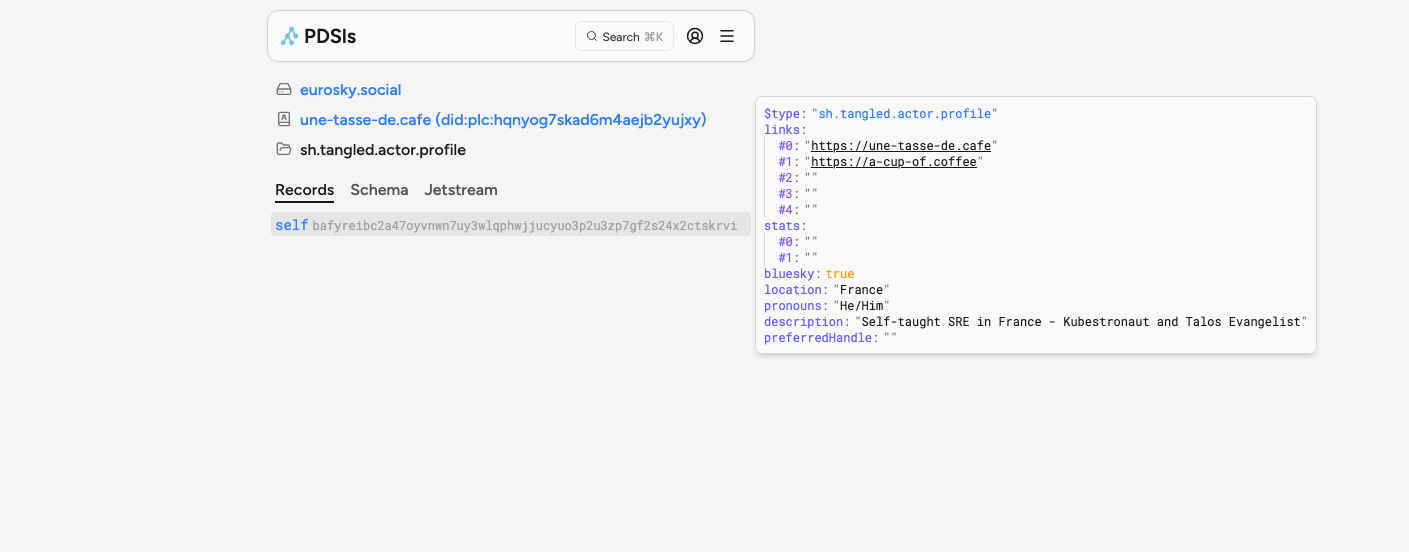
In my bookmarks I keep PDSls, an ATProto repository explorer in the browser: you can hand it a handle, a DID or an AT-URI, and it unpacks everything — collections, records (in JSON and in raw CBOR), blobs, all the way to the CAR export.
The keys: {collection}/{rkey}
In the Merkle Search Tree, each key follows a strict two-segment structure: {collection}/{rkey}.
{collection}is the name of the branch we’re going to dig into, a bit like a table in a database (app.bsky.feed.post).{rkey}is the record key, the record’s key; it can be a timestamp.
So we can read this data directly with a query.
DID=did:plc:hqnyog7skad6m4aejb2yujxy
PDS=https://eurosky.social
curl -s "$PDS/xrpc/com.atproto.repo.listRecords?repo=$DID&collection=app.bsky.feed.post&limit=2"
{
  "records": [
    {
      "uri": "at://did:plc:hqnyog7skad6m4aejb2yujxy/app.bsky.feed.post/3mstlqrvvhk2t",
      "cid": "bafyreicyfr56447e57x3e2e34xy5pywvp446zfs2bcdeocsswhvno5fl5m",
      "value": {
        "text": "Ça y est,  j'ai mon knot (équivalent de PDS BlueSky)",
        "$type": "app.bsky.feed.post",
        "embed": {
          "$type": "app.bsky.embed.images",
          "images": [
            {
              "alt": "",
              "image": {
                "ref": {
                  "$link": "bafkreidp2smbxtqh2yctyskltgerho2wsshukuxe5jqikfkjhhiq6giyfe"
                },
                "size": 232678,
                "$type": "blob",
                "mimeType": "image/jpeg"
              },
              "aspectRatio": {
                "width": 1400,
                "height": 810
              }
            }
          ]
        },
        "langs": [
          "fr"
        ],
        "createdAt": "2026-08-11T21:48:13.806Z"
      }
    },
    {
      "uri": "at://did:plc:hqnyog7skad6m4aejb2yujxy/app.bsky.feed.post/3mstbs5wvlk2a",
      "cid": "bafyreiakxbkpv7vei7wlbfvob44xctxutvgnsbpeq3du7sm4syuy4bi5uq",
      "value": {
        "text": "Honnêtement, c'est vraiment pas mal Tangled. La CI est pratique, l'interface est belle (sauf en PR, là c'est immonde), l'équivalent de Github Pages est bien. \n\nIl manque que les releases et je pourrais migrer un gros nombre de mes repos perso.",
        "$type": "app.bsky.feed.post",
        "embed": {
          "$type": "app.bsky.embed.record",
          "record": {
            "cid": "bafyreigilfsgfgq4nzfeyxx6zzwv4hbbnq55sv4l6ua2obpelbblrmih6e",
            "uri": "at://did:plc:hqnyog7skad6m4aejb2yujxy/app.bsky.feed.post/3mstb5jqqi22a"
          }
        },
        "langs": [
          "fr"
        ],
        "createdAt": "2026-08-11T18:50:02.558Z"
      }
    }
  ],
  "cursor": "3mstbs5wvlk2a"
}
A few things to notice:
- The record key is
app.bsky.feed.post/3mstbs5wvlk2a: collection + TID. - The
uriis an AT-URI:at://{did}/{collection}/{rkey}. It’s the universal address of a record across the whole network, containing the DID, the key and the item’s id. - The
cidis the file’s identifier.
Records and blobs: a strict separation
… so far we’ve basically been doing a REST-like thing, but you should know that a PDS isn’t required to store only text. Concretely, the spec distinguishes two kinds of information:
- Records: the lightweight metadata, structured JSON.
- Blobs: the binary files (images, videos, PDFs…). You send them to the PDS via
com.atproto.repo.uploadBlob, the server returns a Content ID, and the application drops that ID into a record.
The signed commit: self-certification
Here’s the heart of the spec. Every time a record is added, modified or deleted, the hash of the tree’s root changes. The PDS then generates a commit that captures this new state, and signs it with the account’s private key.
This commit contains:
did: the repository’s owner.data: the CID of the MST root (the full state of the repository at that instant).rev: a revision TimeStamp ID, monotonically increasing.prev: a link to the previous commit (currentlynullin the current format).version: the repository format version (currently3).sig: the cryptographic signature of everything above.
Let’s fetch the repository’s current signed state:
DID=did:plc:hqnyog7skad6m4aejb2yujxy
PDS=https://eurosky.social
curl -s "$PDS/xrpc/com.atproto.sync.getLatestCommit?did=$DID"
{
  "cid": "bafyreicffaziov3xn3fjkmtwm5ye6dfsqrob4xubctcy473zdjtojuiyei",
  "rev": "3msvbd7d4gf2v"
}
This cid is the fingerprint of the signed commit (like a file). We’ll see how later, but thanks to it: anyone can verify the validity of this commit.
Fetching the full repository export
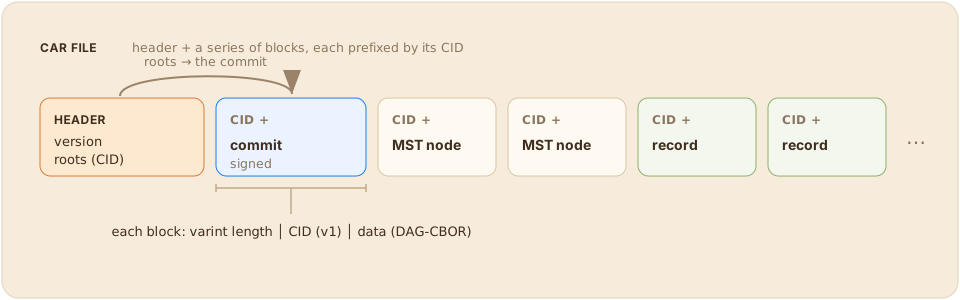
For that, we download the entire repository. ATProto can export a whole PDS (the MST tree and all the records) into a single CAR file (Content Addressable aRchives).
DID=did:plc:hqnyog7skad6m4aejb2yujxy
PDS=https://eurosky.social
curl -s "$PDS/xrpc/com.atproto.sync.getRepo?did=$DID" -o atproto.car
-rw-r--r-- 1 qjoly 2.2M atproto.car
2.2 MiB for my whole account. Let’s open this file with a little CAR reader vibe-coded in Python.
import cbor2, io, base64

def read_varint(f):
    shift = result = 0
    while True:
        b = f.read(1)
        if not b: return None
        b = b[0]; result |= (b & 0x7f) << shift
        if not (b & 0x80): return result
        shift += 7

def read_cid(f):
    assert f.read(1) == b"\x01"          # CIDv1
    read_varint(f); read_varint(f)        # codec, hash code
    f.read(read_varint(f))                # length + digest

def cid_str(tag):
    # CBORTag(42) = CID DAG-CBOR ; strip the 0x00 multibase prefix then base32
    return "b" + base64.b32encode(tag.value[1:]).decode().lower().rstrip("=")

data = open("atproto.car", "rb").read(); f = io.BytesIO(data)
header = cbor2.loads(f.read(read_varint(f)))
print(f"CAR version : {header['version']}")
print(f"root        : {cid_str(header['roots'][0])}")

commit = None
while True:
    blen = read_varint(f)
    if blen is None: break
    start = f.tell(); read_cid(f)
    block = f.read(blen - (f.tell() - start))
    obj = cbor2.loads(block)
    if isinstance(obj, dict) and "sig" in obj and "did" in obj:
        commit = obj

print("\ncommit :")
for k, v in commit.items():
    if k == "sig":
        v = f"<{len(v)} bytes>"
    elif isinstance(v, cbor2.CBORTag):
        v = cid_str(v)
    print(f"  {k:<7}: {v}")
And that gives:
CAR version : 1
root        : bafyreicffaziov3xn3fjkmtwm5ye6dfsqrob4xubctcy473zdjtojuiyei

commit :
  did    : did:plc:hqnyog7skad6m4aejb2yujxy
  rev    : 3msvbd7d4gf2v
  sig    : <64 bytes>
  data   : bafyreih7z664my6jus6jubl72wkohuuafuux6m3qolalglgucgur7og3va
  prev   : None
  version: 3
We recover exactly the commit described above, with its 64-byte signature. The rev (3msvbd7d4gf2v) matches what getLatestCommit sent us. But fetching this commit isn’t enough: we also have to attest that it’s genuinely valid.
Verifying the signature yourself
Since we deliberately don’t want to trust the provenance of this commit, we’d better verify its authenticity. The ATProto signature is an ECDSA, computed over the SHA-256 of the commit (with the signature we don’t trust removed) re-encoded in DAG-CBOR. As for the public key, we already have it: it’s the zQ3shvi9... from the DID document.
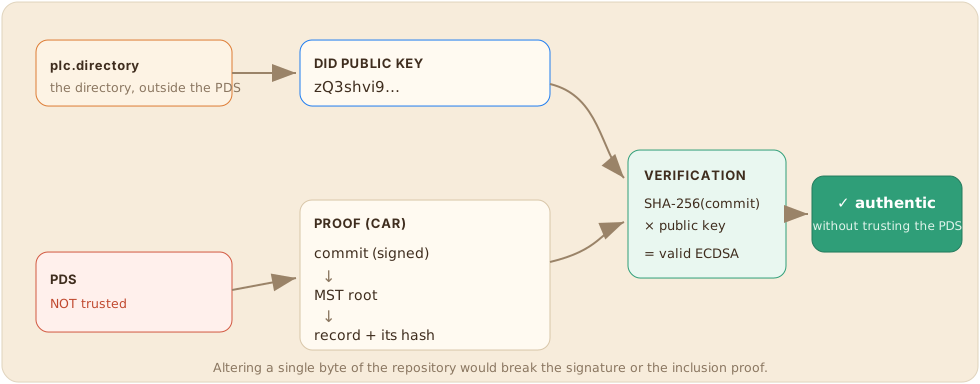
The plan:
- Take the commit.
- Remove the existing signature and re-encode it in canonical CBOR.
- Compute its SHA-256.
- Decode the public key from the DID document.
- Verify the ECDSA signature with that public key.
Let’s call on uncle Claude again to whip up a quick script:
import cbor2, io, hashlib, base58, ecdsa

def read_varint(f):
    shift = result = 0
    while True:
        b = f.read(1)
        if not b: return None
        b = b[0]; result |= (b & 0x7f) << shift
        if not (b & 0x80): return result
        shift += 7

def read_cid(f):
    assert f.read(1) == b"\x01"          # CIDv1
    read_varint(f); read_varint(f)        # codec, hash code
    f.read(read_varint(f))                # length + digest

# 0 : re-read the CAR to find the commit (DAG-CBOR block with 'sig' + 'did')
f = io.BytesIO(open("atproto.car", "rb").read())
cbor2.loads(f.read(read_varint(f)))       # CAR header (ignored)
commit = None
while True:
    blen = read_varint(f)
    if blen is None: break
    start = f.tell(); read_cid(f)
    obj = cbor2.loads(f.read(blen - (f.tell() - start)))
    if isinstance(obj, dict) and "sig" in obj and "did" in obj:
        commit = obj

# 1-3 : the signed message = commit without 'sig', in canonical DAG-CBOR, then sha256
sig = commit.pop("sig")
sig = sig.value if hasattr(sig, "value") else sig
msg = cbor2.dumps(commit, canonical=True)
digest = hashlib.sha256(msg).digest()

# 4 : public key from the DID doc. 'z' = base58btc, prefix 0xe7 0x01 = secp256k1-pub
mk = "zQ3shvi9RBYFYwfzbkju871YNjv9EDAZ5Cy52PY5nNkQiH215"  # #atproto key from the DID doc (plc.directory)
raw = base58.b58decode(mk[1:])
assert raw[0] == 0xe7 and raw[1] == 0x01
vk = ecdsa.VerifyingKey.from_string(raw[2:], curve=ecdsa.SECP256k1)  # compressed point

# 5 : ECDSA verification (compact 64-byte r||s signature)
try:
    ok = vk.verify_digest(sig, digest)
except ecdsa.BadSignatureError:
    ok = False

print("signed message :", len(msg), "bytes | sha256 :", digest.hex()[:24], "...")
print(">>> SIGNATURE VALID :", ok)
signed message : 118 bytes | sha256 : 1ad6ce66af92b2624236353f ...
>>> SIGNATURE VALID : True
We just took a file downloaded from a server on the network, extracted the commit from it, and proved — using only the account’s public key (published in an independent directory) — that this commit was indeed signed by the private key of une-tasse-de.cafe.
Tip
This is what radically sets ATProto apart from a classic API. With a normal REST API, when api.example.com returns a post, you have to believe the server isn’t lying. Here, trust is shifted away from the server (which can be anyone) toward the key (which is verifiable by everyone). An intermediate server, a relay, a cache, a mirror: it doesn’t matter who serves you the data, you can always validate it.
Blobs: files addressed by their content
Blobs are the binary files (images, videos…) that records merely reference. Let’s list the ones in my repository and fetch one, with no authentication whatsoever:
DID=did:plc:hqnyog7skad6m4aejb2yujxy
PDS=https://eurosky.social
CID=$(curl -s "$PDS/xrpc/com.atproto.sync.listBlobs?did=$DID&limit=1" | jq -r '.cids[0]')
echo $CID   # bafkreia2chbwa44vquidtt6tpycv4dqhlvm3htbszke22h6lkot7t6dxkm

curl -s "$PDS/xrpc/com.atproto.sync.getBlob?did=$DID&cid=$CID" -o blob.bin
file blob.bin
blob.bin: JPEG image data, JFIF standard 1.01, baseline, precision 8, 1500x2000, components 3
The CIDs of the JPEG files all start with bafkrei (whereas the commit records started with bafyrei).
But the most interesting part, as we saw above, is that this CID isn’t an arbitrary identifier but the hash of the file’s content… which means we can recompute it and check we didn’t receive a tampered file (and this validation fits in a few lines of code).
import hashlib, base64
data = open("blob.bin", "rb").read()
digest = hashlib.sha256(data).digest()
cidv1 = bytes([0x01, 0x55, 0x12, len(digest)]) + digest   # CIDv1 + raw(0x55) + sha256(0x12)
print("b" + base64.b32encode(cidv1).decode().lower().rstrip("="))
bafkreia2chbwa44vquidtt6tpycv4dqhlvm3htbszke22h6lkot7t6dxkm
Identical, down to the character. It’s the same CID and multihash mechanism that IPFS is built on, which I covered in a previous article: a file is reachable via its fingerprint.
Deploying your own PDS
Everything we’ve done so far has been reading from someone else’s PDS, but there’s a lot to know on the “dev/admin” side. The reference PDS is distributed by Bluesky (bluesky-social/pds) as a single Docker image. The official distribution targets a dedicated server with Caddy for TLS, but you know me well: we’re obviously going to put it on Kubernetes with Talos!
A PDS needs three secrets. Two are just random strings, the third is a secp256k1 private key: a rotation key used to sign operations on the PLC DID.
kubectl create namespace pds
kubectl -n pds create secret generic pds-secrets \
  --from-literal=PDS_JWT_SECRET=$(openssl rand -hex 16) \
  --from-literal=PDS_ADMIN_PASSWORD=$(openssl rand -hex 16) \
  --from-literal=PDS_PLC_ROTATION_KEY_K256_PRIVATE_KEY_HEX=$(openssl ecparam \
      -name secp256k1 -genkey -noout --outform DER | tail -c +8 | head -c 32 | xxd -p -c 256)
Warning
This PLC rotation key is the real treasure. It’s the one that authorizes changes to an account’s DID document (switching PDS, changing keys). Losing it means losing control of the hosted identities for good. So we’d better back this up!
The official compose runs in network_mode: host with a pds.env file. On Kubernetes, that turns into a Deployment + Service + Ingress. The PDS relies on SQLite and an event sequencer on a ReadWriteOnce volume.
apiVersion: apps/v1
kind: Deployment
metadata: { name: pds, namespace: pds }
spec:
  replicas: 1
  strategy: { type: Recreate }
  selector: { matchLabels: { app: pds } }
  template:
    metadata: { labels: { app: pds } }
    spec:
      securityContext: { fsGroup: 1000 }   # volume writable by the 'node' user
      containers:
        - name: pds
          image: ghcr.io/bluesky-social/pds:0.4
          ports: [{ containerPort: 3000 }]
          env:
            - { name: PDS_HOSTNAME, value: "pds.mocha.thoughtless.eu" }
            - { name: PDS_DATA_DIRECTORY, value: "/pds" }
            - { name: PDS_BLOBSTORE_DISK_LOCATION, value: "/pds/blocks" }
            - { name: PDS_DID_PLC_URL, value: "https://plc.directory" }
            - { name: PDS_BSKY_APP_VIEW_URL, value: "https://api.bsky.app" }
            - { name: PDS_BSKY_APP_VIEW_DID, value: "did:web:api.bsky.app" }
            - { name: PDS_CRAWLERS, value: "https://bsky.network" }   # the relay to notify of our arrival
            - { name: PDS_SERVICE_HANDLE_DOMAINS, value: ".pds.mocha.thoughtless.eu" }
            - { name: PDS_INVITE_REQUIRED, value: "true" }
            # the 3 secrets are injected from the pds-secrets Secret via secretKeyRef
          volumeMounts: [{ name: data, mountPath: /pds }]
          readinessProbe: { httpGet: { path: /xrpc/_health, port: 3000 } }
      volumes:
        - name: data
          persistentVolumeClaim: { claimName: pds-data }
For the ingress, we’ll also need to declare a wildcard that will serve our users/applications.
apiVersion: networking.k8s.io/v1
kind: Ingress
metadata:
  name: pds
  namespace: pds
  annotations: { cert-manager.io/cluster-issuer: cloudflare }
spec:
  ingressClassName: traefik
  rules:
    - host: pds.mocha.thoughtless.eu        # the PDS
      http: { paths: [{ path: /, pathType: Prefix,
              backend: { service: { name: pds, port: { number: 3000 } } } }] }
    - host: "*.pds.mocha.thoughtless.eu"     # the hosted handles
      http: { paths: [{ path: /, pathType: Prefix,
              backend: { service: { name: pds, port: { number: 3000 } } } }] }
  tls:
    - hosts: ["pds.mocha.thoughtless.eu", "*.pds.mocha.thoughtless.eu"]
      secretName: pds-tls
After that, we’ll have our PDS available for us!
curl -s https://pds.mocha.thoughtless.eu/xrpc/_health
# {"version":"0.4.5027"}

curl -s https://pds.mocha.thoughtless.eu/xrpc/com.atproto.server.describeServer
{
  "did": "did:web:pds.mocha.thoughtless.eu",
  "availableUserDomains": [".pds.mocha.thoughtless.eu"],
  "inviteCodeRequired": true,
  "blobUploadLimit": 52428800
}
Note that the PDS itself has an identity: did:web:pds.mocha.thoughtless.eu.
The server requires an invitation code. We generate one with the admin password (which we set in the Deployment manifest), then create a first account.
# 1. an invitation code
curl -s -u "admin:$PDS_ADMIN_PASSWORD" -X POST \
  https://pds.mocha.thoughtless.eu/xrpc/com.atproto.server.createInviteCode \
  -H "Content-Type: application/json" -d '{"useCount":1}'
# {"code":"pds-mocha-thoughtless-eu-dozhd-pmsfi"}

# 2. the account
curl -s -X POST https://pds.mocha.thoughtless.eu/xrpc/com.atproto.server.createAccount \
  -H "Content-Type: application/json" -d '{
    "email":"pds-demo@thoughtless.eu",
    "handle":"quentin.pds.mocha.thoughtless.eu",
    "password":"...",
    "inviteCode":"pds-mocha-thoughtless-eu-dozhd-pmsfi"}'
{
  "handle": "quentin.pds.mocha.thoughtless.eu",
  "did": "did:plc:zzk6wzyfgltonuuex2suxai4",
  "accessJwt": "eyJ0eXAiOiJhdCtqd3Qi...",
  "refreshJwt": "..."
}
By creating this account, my PDS generated a did:plc and published the creation operation on plc.directory, the public directory. My demo account now exists on the federated network, independently of my server. Along the way we get an accessJwt: that’s the token that will authenticate the writes.
Writing to your own repository
Now we can freely write to our repo, which will have an impact on the ATProto applications. Let’s create, for example, a Bluesky post:
AUTH="Authorization: Bearer $ACCESS_JWT"
DID=did:plc:zzk6wzyfgltonuuex2suxai4
# a post
curl -s -X POST https://pds.mocha.thoughtless.eu/xrpc/com.atproto.repo.createRecord -H "$AUTH" -d '{
  "repo":"'$DID'", "collection":"app.bsky.feed.post",
  "record":{"$type":"app.bsky.feed.post","text":"First post from my PDS!",
            "createdAt":"2026-08-12T...Z","langs":["en"]}}'
{
  "uri": "at://did:plc:zzk6wzyfgltonuuex2suxai4/app.bsky.feed.post/3msutcanuj22n",
  "cid": "bafyreibrisducmkzrqxsmj3ajyr2qsqdy46iq263zxadawsjkt2l3xzvvm",
  "commit": { "rev": "3msutcao6bk2n" },
  "validationStatus": "valid"
}
Each write returns the record’s AT-URI (with my DID), its CID, and above all a new commit. An uploadBlob of an image gives me back a blob CID, which I then drop into an app.bsky.actor.profile as an avatar. These are operations we could have done through the Bluesky UI, but we’re doing them straight into our registry.
curl -s ".../xrpc/com.atproto.repo.describeRepo?repo=$DID"
# collections: ['app.bsky.actor.profile', 'app.bsky.feed.post']
Re-verifying our account’s signature
The moment of truth. I take exactly the verification script written earlier for une-tasse-de.cafe, but pointed at my repository. The public key, I read it from plc.directory (not from my PDS: that’s the whole point):
curl -s "https://plc.directory/$DID" | jq -r '.verificationMethod[0].publicKeyMultibase'
# zQ3shWLfbzWjtbCmqaHwBhs37hcv5atdvt9eWmEMjnsXzb34R

curl -s ".../xrpc/com.atproto.sync.getRepo?did=$DID" -o mypds.car   # 1.1 KiB
python3 verify_sig.py mypds.car zQ3shWLfbzWjtbCmqaHwBhs37hcv5atdvt9eWmEMjnsXzb34R
>>> SIGNATURE VALID : True
And the counter-test, this time with the key of une-tasse-de.cafe:
>>> SIGNATURE VALID : False
My PDS, on my cluster, produces exactly the same kind of self-certified repository as Bluesky’s official server.
Confirming we’re properly federated
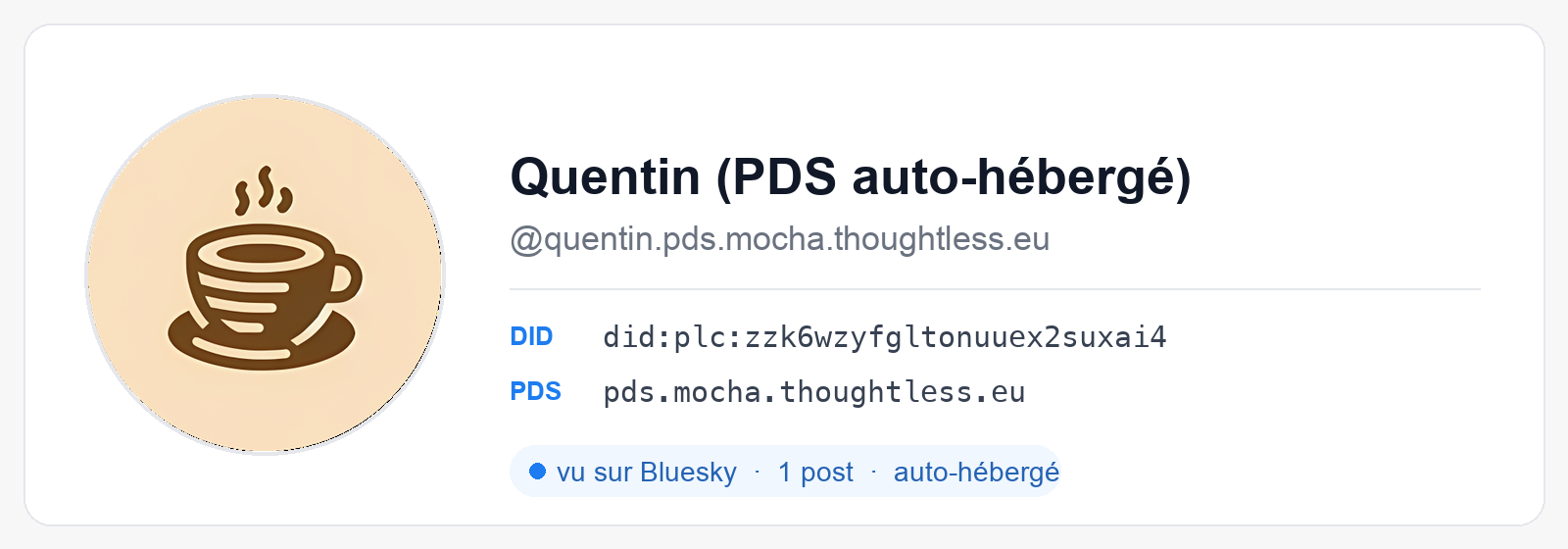
The goal of ATProto is to build community platforms, so we’d better check that Bluesky is aware of our existence. Mine was configured with PDS_CRAWLERS=https://bsky.network, so on account creation it notified the network relay. As a result, when I query Bluesky’s public AppView by DID, I do see my test account.
curl -s "https://public.api.bsky.app/xrpc/app.bsky.actor.getProfile?actor=$DID"
{
  "did": "did:plc:zzk6wzyfgltonuuex2suxai4",
  "handle": "quentin.pds.mocha.thoughtless.eu",
  "displayName": "Quentin (self-hosted PDS)",
  "associated": {
    "lists": 0,
    "feedgens": 0,
    "starterPacks": 0,
    "labeler": false,
    "activitySubscription": {
      "allowSubscriptions": "followers"
    }
  },
  "description": "Demo account for a blog post about ATProto",
  "followersCount": 0,
  "followsCount": 0,
  "postsCount": 1
}
My post, written on my server, is indexed by Bluesky’s infrastructure. The loop is closed: storage on my side, indexing and reading on theirs.
By counting the records per type directly in the CAR file or via pdsls, we find quite a bit of information about what I do (here on my real account, une-tasse-de.cafe).
As of today:
- 5044 records spread across 34 collections:
- 2513 app.bsky.feed.like
- 1926 app.bsky.feed.post
- 250 app.bsky.graph.follow
- 41 id.sifa.profile.skill <- a structured CV (SIFA)
- 4 sh.tangled.repo <- a Git forge (Tangled)
- 1 blog.pckt.publication <- a blogging platform
- 1 app.offprint.actor.profile <- another publishing app
On my single account, we already see several applications all storing information (Tangled, pckt, Bluesky, Sifa); my PDS has no say, and a third-party application can freely create its own entry in my repo.
Since each record has a universal address (its AT-URI), a record from one app can reference one from another app. We saw it in the post above: my second post embedded an app.bsky.embed.record. Nothing stops you from linking a Bluesky post to a Tangled ticket, or to a self-hosted blog article.
So, to see how it actually works, let’s build our own application based on ATProto.
Writing an app on ATProto
The most interesting part is left: writing an app built on ATProto. Just above, I said anyone can create their own schema, so I built a little tool, Notary (whose code, by the way, lives on Tangled, i.e. in an ATProto repository). The idea: timestamp a file’s fingerprint in your repository so you can store its signature on ATProto and have a file’s content stamped by me.
I took inspiration from what GPG does in this area: creating a unique signature of a file to validate its authenticity.
Creating the schema
Creating a new data type on ATProto is like writing a CRD on Kubernetes: you validate a format and let the API consume it. In the ATProto context, it’s a JSON file describing the shape of a record, called a lexicon, identified by an NSID (a reversed domain name, under a domain you control). Mine, under a-cup-of.coffee:
{
  "lexicon": 1,
  "id": "coffee.a-cup-of.notary.stamp",
  "defs": {
    "main": {
      "type": "record",
      "key": "tid",
      "record": {
        "type": "object",
        "required": ["hash", "createdAt"],
        "properties": {
          "hash":      { "type": "string" },
          "subject":   { "type": "string" },
          "createdAt": { "type": "string", "format": "datetime" }
        }
      }
    }
  }
}
And that’s it. No database migration, no schema to get approved. The PDS doesn’t know coffee.a-cup-of.notary.stamp and doesn’t care: it will store my records as-is (with just a validationStatus: unknown, which is perfectly normal for a third-party lexicon).
Writing our record
A stamp in Notary is an authenticated com.atproto.repo.createRecord write into the user’s repository. The core fits in a single call:
curl -s -X POST "$PDS/xrpc/com.atproto.repo.createRecord" -H "$AUTH" -d '{
  "repo": "'$DID'",
  "collection": "coffee.a-cup-of.notary.stamp",
  "record": {
    "$type": "coffee.a-cup-of.notary.stamp",
    "hash": "sha256:bbf8e70148535496...",
    "subject": "contrat.txt",
    "createdAt": "2026-08-15T08:04:39.581Z"
  }
}'
Notary wraps this up in a small Go CLI (using indigo, Bluesky’s reference library). I run it against the PDS we deployed earlier:
$ notary stamp --subject notary2.txt notary2.txt
notarized
  digest : sha256:bbf8e70148535496cbe9558b916930bf9532a53225a16c28db4ccbb0c612c1d5
  subject: notary2.txt
  uri    : at://did:plc:zzk6.../coffee.a-cup-of.notary.stamp/3mt47lsowxk2n
  rev    : 3mt47lspdns2n
At that instant, my record is in my PDS, a new signed commit has been produced, and the write has gone out onto the network. Its fingerprint will be available to anyone who asks.
Verifying without trusting the server
Verifying a stamp is redoing exactly what we did by hand with our Python that validates the signature, but packaged up:
$ notary verify notary2.txt at://did:plc:zzk6.../coffee.a-cup-of.notary.stamp/3mt47lsowxk2n
notarized by  : did:plc:zzk6wzyfgltonuuex2suxai4 (quentin.pds.mocha.thoughtless.eu)
committed rev : 3mt47lspdns2n
stamped at    : 2026-08-15T08:04:39.581Z
stamped hash  : sha256:bbf8e70148535496cbe9558b916930bf9532a53225a16c28db4ccbb0c612c1d5
your content  : sha256:bbf8e70148535496cbe9558b916930bf9532a53225a16c28db4ccbb0c612c1d5

signature valid, and stamp included in the signed repository.
MATCH: this content was notarized by did:plc:zzk6wzyfgltonuuex2suxai4
Under the hood, we verify three times, none of them trusting the PDS that serves the data:
- The public key is read from plc.directory (the directory), not from the PDS.
com.atproto.sync.getRecordreturns a proof: the signed commit, the MST nodes down to the record, and the record itself. The commit’s signature is verified with the key from step 1.- The record is reached from the signed MST root (so it really is included in the signed repository), then its
hashfield is compared with my file’s fingerprint.
And what if someone tampered with the file in the meantime? It shows up immediately:
$ notary verify notary2-edited.txt at://did:plc:zzk6.../coffee.a-cup-of.notary.stamp/3mt47lsowxk2n
signature valid, and stamp included in the signed repository.
error: MISMATCH: the stamp is authentic, but its hash does not match your content
This is a very simple use case that ATProto enables; we could have imagined a much more complex application.
Conclusion
I hope that with this article you’ll have a slightly better grasp of how Bluesky and its whole ecosystem work. Building a community service on this foundation is a real win (and very timely with the data sovereignty everyone is after).
This is where I think Bluesky will go further than the other alternatives (like Mastodon), because it offers a complete, very open ecosystem. The ground is ready to grow the ATmosphere and contribute to its expansion.
The only limit in my eyes is the governance of the central plc.directory registry that federates the PDSes, but Bluesky is working on setting up a Swiss association that could take the project over.
It’s only been a little week since I got into ATProto, so don’t hesitate to send me a DM (Bluesky) or leave a comment if you spot any blunders.
Enjoy your brew ☕